MCP Integration Credentials
Many MCP servers need credentials — such as API keys or tokens — supplied as environment variables. When an MCP server is added to an assistant that other people use, AI/Run CodeMie decides whose credentials each person runs under, and always resolves them per user at run time: a user's own secrets are never exposed to other users of the same assistant, and if a user selects no integration the server still runs on its base configuration instead of failing.
How credentials are resolved
For any MCP server, the credentials a given user runs under come from one of three sources. Which one applies is decided first by the assistant author (did they pin an integration?), then, for non-pinned servers, by the user's own selection.
| Source | Set by | Whose credentials are used |
|---|---|---|
| Pinned | Author | The author's chosen integration — shared by everyone using the assistant |
| Explicit | User | The integration the user selected for themselves |
| Default | User | None — the server runs on its clean base configuration (no integration credentials) |
An MCP server is one kind of integration slot, and the author's decision for it follows the same three states as any other slot — pinned, automatic lookup, or no integration. See Automatic Credentials Lookup for the shared model.
The rest of this page explains how to configure each source and what it guarantees.
Pinned — one shared integration for everyone
Set by the author. Every user of the assistant runs the MCP server under the author's chosen integration.
Pin an integration when a single, shared account should back the MCP server for all users. This is the long-standing behavior for MCP servers and keeps existing assistants working without any changes.
Pin an integration
- Open the Create Assistant or Edit Assistant page and add or expand the MCP server (see Adding an MCP Server).
- In the assistant form, select an integration for the server. Any integration available to the author can be pinned — a personal integration, a project integration, or a global integration.
- Save the assistant.
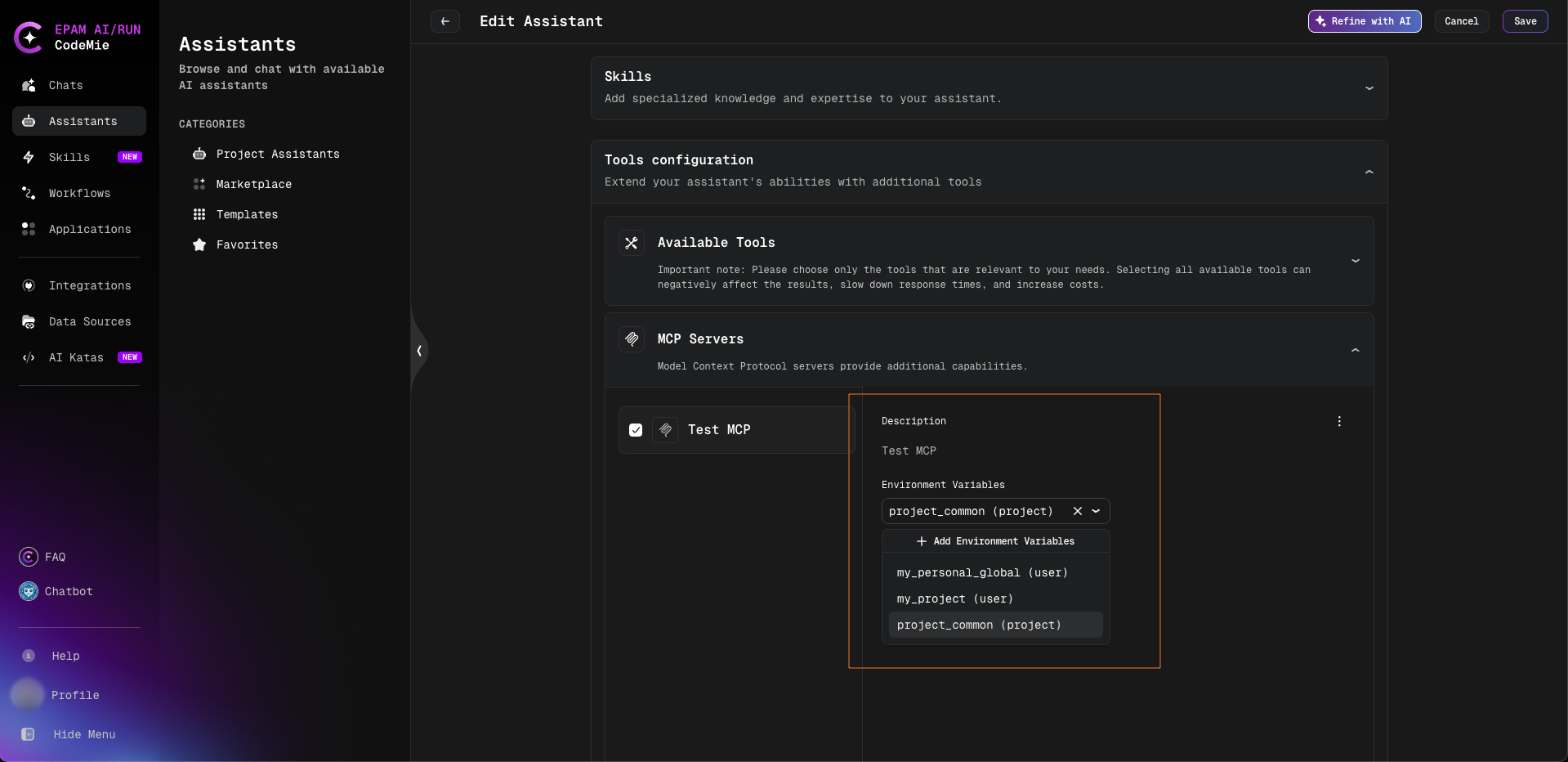
Once pinned, those credentials are applied to every user of the assistant when its MCP tools run. A pinned integration is not shown to other users in their own selection, and its secret values are never exposed to them — the integration is simply used on their behalf. The server therefore does not appear in each user's per-user integration settings: there is nothing for consumers to choose.
Pin an integration when everyone should connect through the same shared account. Leave it unpinned when each person should connect with their own credentials.
Explicit — each user brings their own integration
Set by each user. Applies only to that user and is remembered across chats.
When the author does not pin an integration, the MCP server becomes available for per-user selection.
Select an integration
- Open the assistant and go to its Your Integration Settings section.
- Find the MCP server in the list.
- Choose one of the integrations offered for the server from the dropdown.
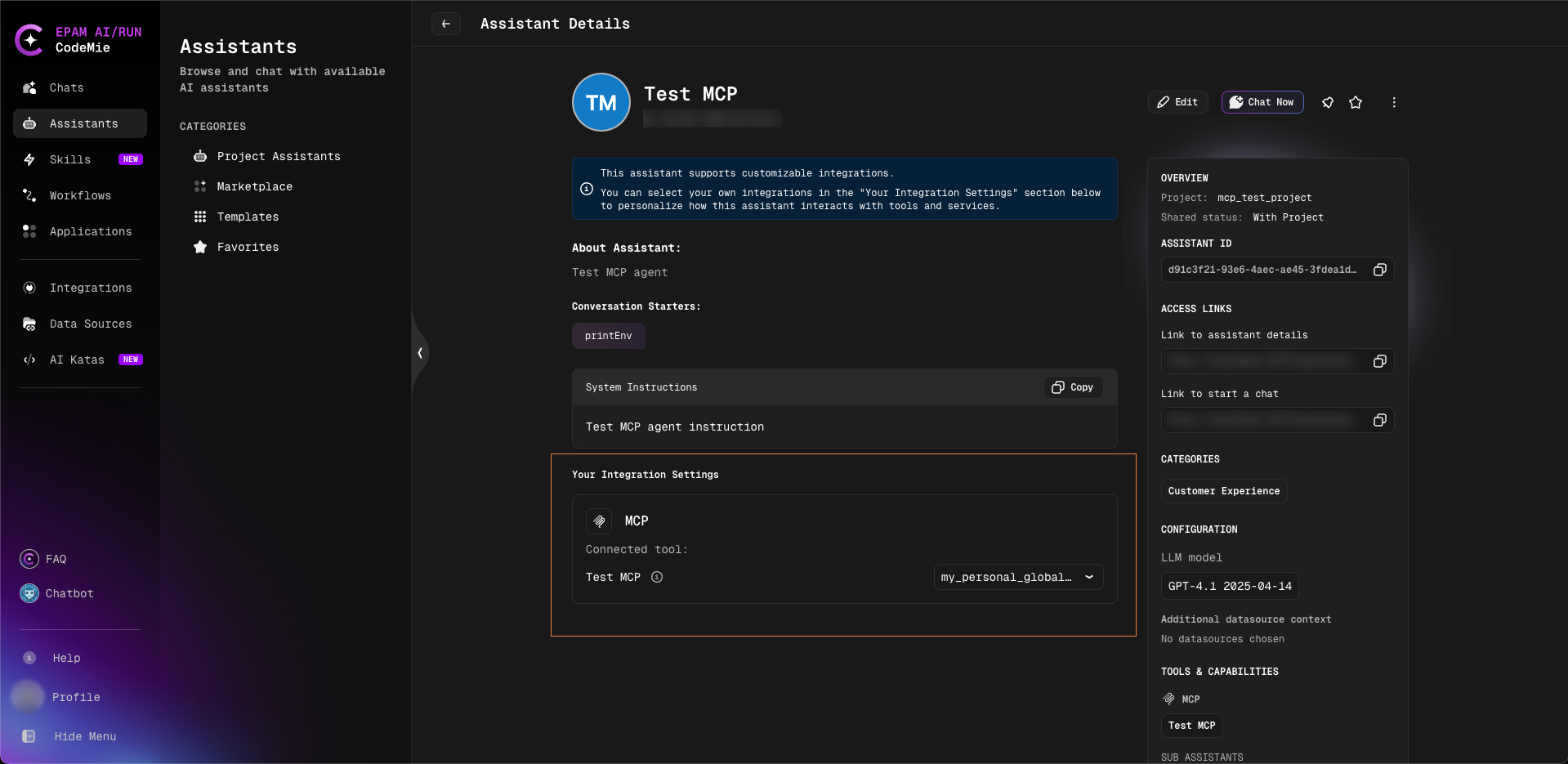
The choice is stored per user and applied automatically in every chat with the assistant — no other user is affected.
Which integrations are offered
The integrations offered depend on how the assistant is shared:
- Project-shared assistant (the user is a member of its project): the user's personal (USER) integrations of that project, their global integrations, and the project (PROJECT) integrations of that project.
- Marketplace or global assistant: all of the user's MCP integrations — personal integrations from any project, global integrations, and the project integrations of any project. The project-membership restriction is lifted, because a consumer is usually not a member of the author's project and still needs to bring their own credentials.
A user only ever sees and selects their own integrations (or integrations they are otherwise allowed to use). Another user's personal integrations are never shown and can never be selected.
Default — "No integration"
The fallback when no integration is pinned and the user has not selected one.
The Your Integration Settings dropdown includes an explicit No integration option. Selecting it means the MCP server runs on its base configuration: the inline configuration defined on the server itself, with no integration credentials applied. The server keeps working; it simply does not carry any per-user credentials.
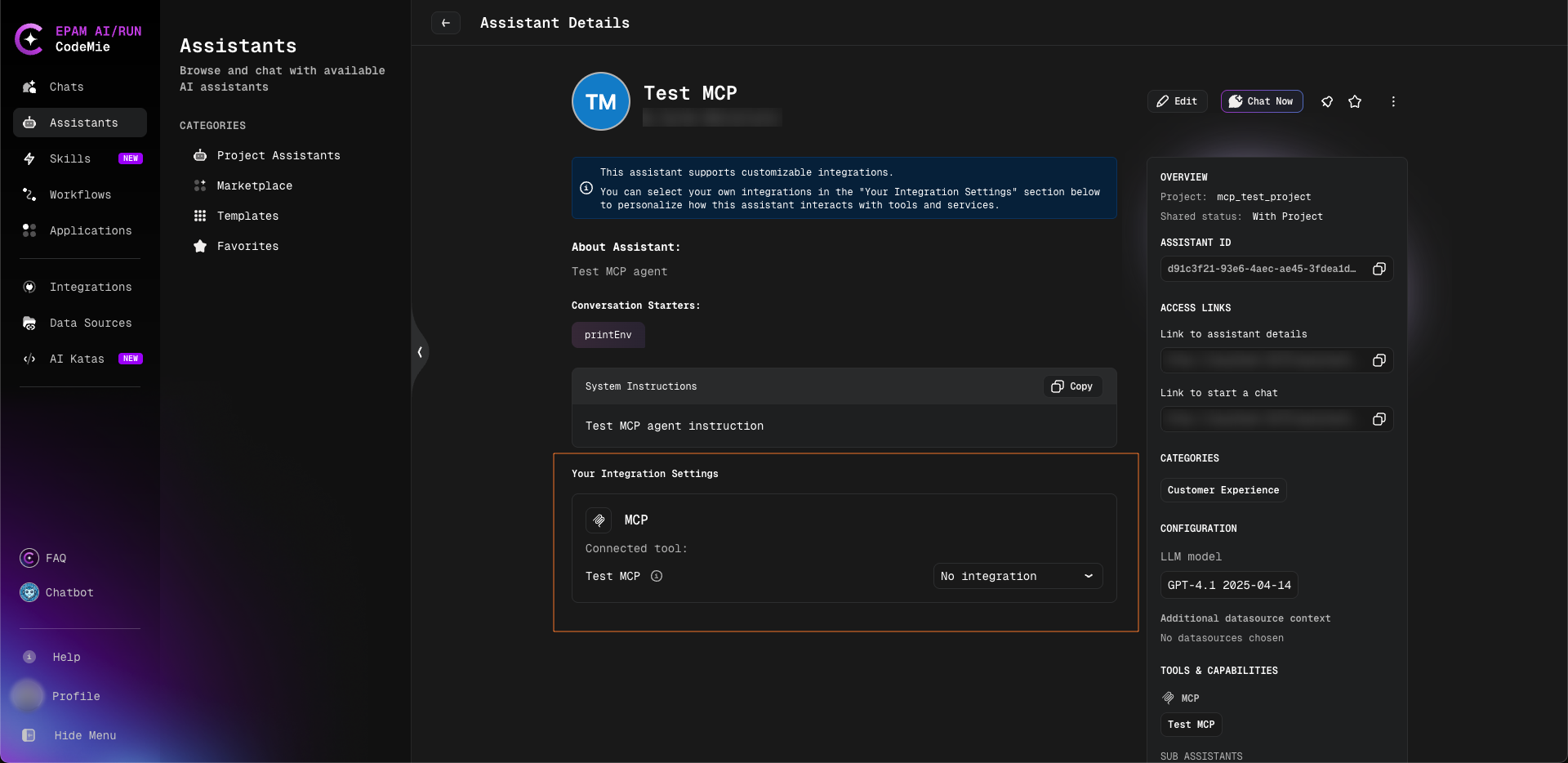
An explicit No integration is a decision like any other: it is remembered for that user and is not replaced by an automatically resolved integration the next time the assistant runs. Leaving the selection untouched is different — the slot then follows whatever the author configured for it, which may be automatic credentials lookup.
For authors: Credential Review when publishing to the marketplace
When an assistant is published to the marketplace, AI/Run CodeMie checks whether it carries any inline credentials — for example a pinned MCP integration or inline environment values that will be used by everyone who runs the assistant. If it does, a Credential Review step is shown before publishing:
This assistant contains inline credentials that will be used by users.
Inline credentials will not be visible to other users, but will be used for integration purposes.
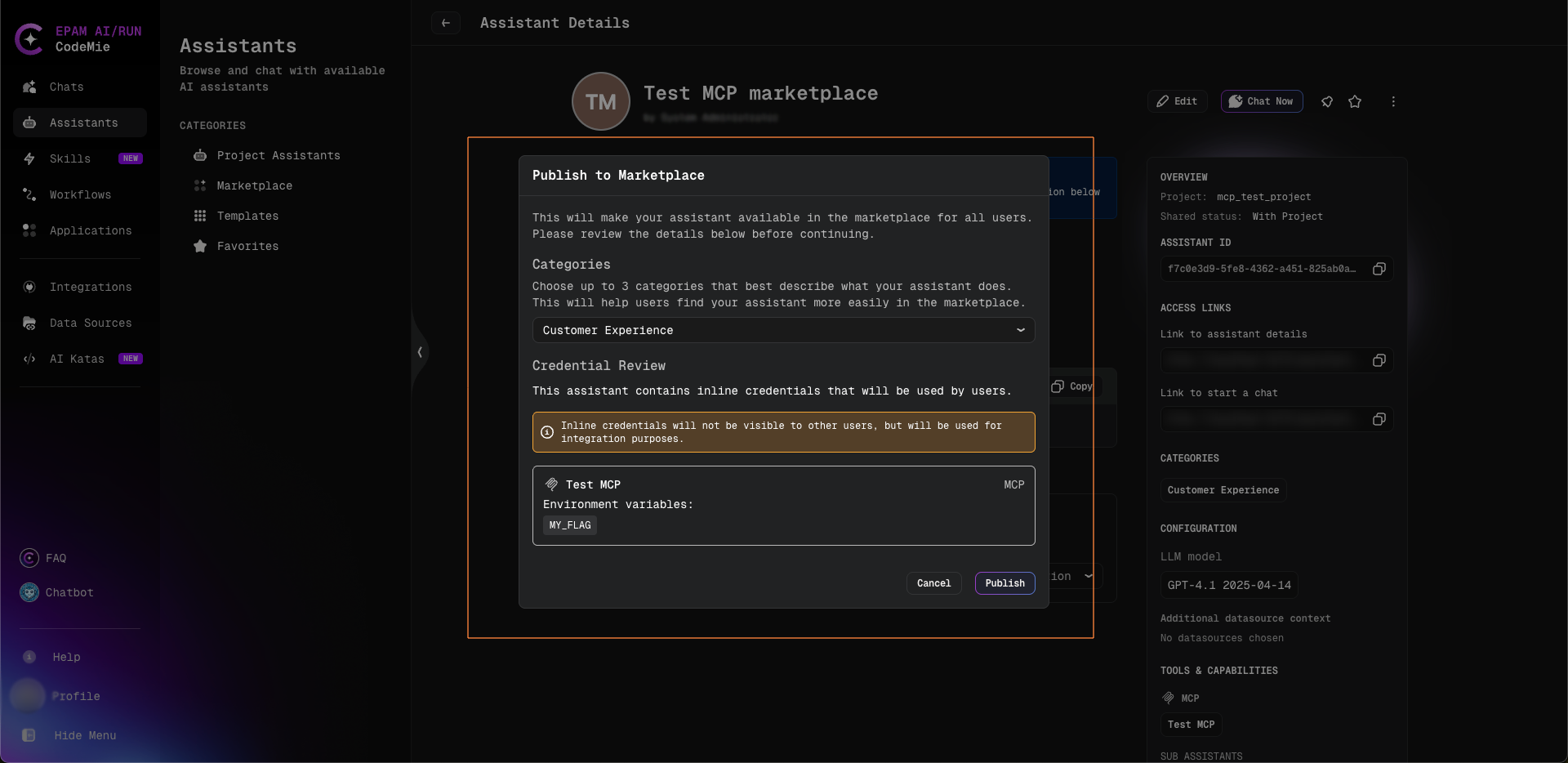
This is a deliberate confirmation, not an error. It reminds the author that consumers of the published assistant will run the MCP server under the author's pinned/inline credentials (without ever seeing the secret values), so the author can decide whether that is the intent — or whether the server should instead be left unpinned so each user brings their own integration.
Privacy and isolation
Beyond the per-user resolution described above, a few guarantees are enforced at run time:
- Access is enforced on save and at run time. Saving an integration the user cannot access is rejected, and an inaccessible integration is never applied when the server runs. On a project-shared assistant, project integrations are limited to the assistant's own project and its members; on a marketplace or global assistant the project-membership restriction is relaxed — but every credential still resolves under the current user.
- Per-user cache isolation. Each user's MCP tools run in an isolated per-user cache, so a result produced under one user's credentials is never reused for another user.
In workflows
When an assistant is used as a node inside a workflow, the same per-assistant credential source applies: the assistant node runs under the current user with the same pinned, explicit, or "No integration" behavior it would use in a direct chat. Project-scoped integrations resolve against the running user's access just as they do in chat.
An explicit selection can also be made without leaving the workflow: clicking an assistant node on the workflow executions page opens a panel with its Your Integration Settings section, where the selection can be saved for that workflow alone instead of for the assistant everywhere. See Assistant Panel on the Executions Page.