Add and Index Git Data Sources
Connect and index Git repositories as data sources.
Git repositories are one of the most powerful data sources in AI/Run CodeMie, enabling assistants to analyze code, understand repository structure, and work with your codebase directly. Git data sources index both source code and binary document types — including PDFs, MS Office files, and images — making them suitable for Talk-to-your-Data scenarios where a repository serves as a document store. This guide walks you through the process of adding and indexing Git repositories, including the Git FAQ processing mode for Markdown-based FAQ content (see Git FAQ Data Source below).
Supported File Types
Git data sources index all text-based files and the following binary document formats:
| Format | Extensions | Processing method |
|---|---|---|
.pdf | Text extraction | |
| Word | .docx | Text and content extraction |
| Excel | .xlsx | Markdown tables |
| PowerPoint | .pptx | Text extraction |
.msg, .eml | Text and metadata extraction | |
| Images | .png, .jpg, .jpeg | Semantic description via multimodal LLM |
All other files (source code, Markdown, JSON, YAML, plain text, etc.) are indexed as text.
Images are processed using an LLM vision model to extract semantic information. If no multimodal model is configured in the CodeMie instance, image files are skipped during indexing.
Use the Files Filter field to include or exclude specific formats. For example, to index only documents and skip code files: *.pdf,*.docx,*.xlsx,*.pptx
Prerequisites
This data source requires you to have at least one Git integration added to AI/Run CodeMie. For more details, please refer to the Integrations Overview guidelines.
Before adding a Git data source, ensure you have:
- Configured Git integration (GitHub, GitLab, or Bitbucket)
- Access to the repository you want to index
- Appropriate permissions to access repository content
If you haven't configured a Git integration yet, follow the Integrations Guide first.
Adding a Git Data Source
To index a Git repository, fill in the following fields:
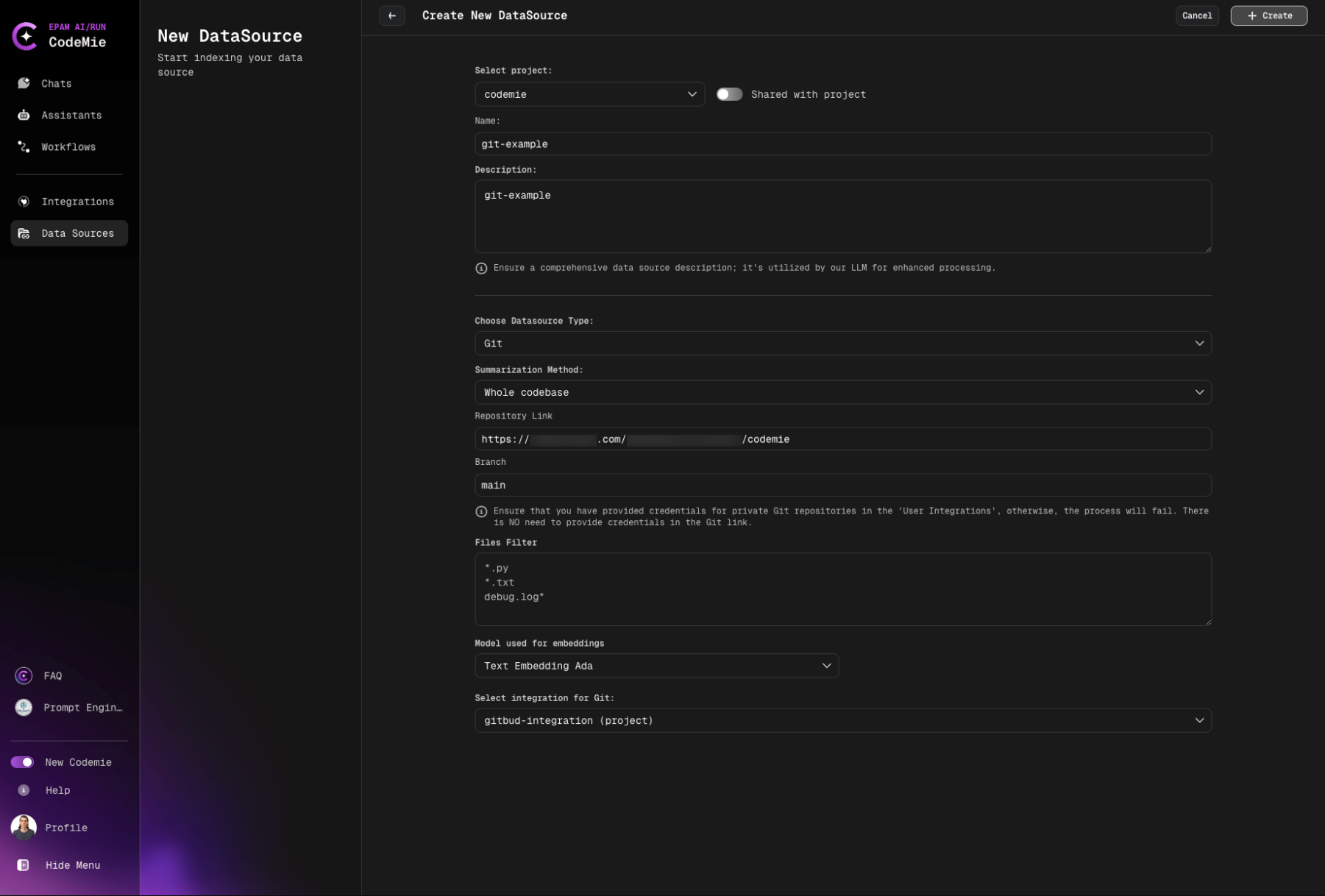
Configuration Fields
4. Select Source Type
- Select Project: Select the name of the project with which you want to associate that DataSource.
- Name: Alias for file for quick search in datasource list.
- Description: Description for this datasource
- Choose Datasource Type: Git source type in the add new data source window.
- Choose Available indexing types:
- Whole codebase
- Summarization per file
- Summarization per chunks
Direct indexing of raw code
- Best for: Quick setup, simple code analysis
- Use when: You want fast access to code without additional processing
Generates summaries for each file
- Best for: Documentation generation, code overview
- Use when: You need high-level understanding of codebase
Creates summaries for code chunks
- Best for: Large codebases, detailed navigation
- Use when: You need comprehensive code understanding
- Note: Preferred mode, takes approximately 30-60 minutes
- Whole codebase: Fast setup, ideal for small projects (< 500 files)
- Per file: Best for documentation and code overview
- Per chunks: Recommended for production use and large codebases
- Repository Link:
- GitHub
- GitLab
- Bitbucket
https://github.com/username/repository
https://gitlab.com/username/repository
https://bitbucket.org/username/repository
- Branch: Specify the target branch to work with.
Always use stable branches (e.g., main, master, develop) for indexing. Feature branches may be deleted, breaking your data source.
- Files Filter: Specify relevant file extensions to index in the field.
Filter behavior:
- Empty filter: Include all files
- Patterns (e.g.,
*.py): Include ONLY matching files (whitelist) - !Patterns (e.g.,
!*.nupkg): EXCLUDE matching files (blacklist) - Combined (e.g.,
*.py,!test_*.py): Include .py files except test_*.py files
Examples:
- Python projects:
*.py- Only Python files - JavaScript/TypeScript:
*.js,*.ts,*.tsx,*.jsx- Only JS/TS files - Exclude binaries:
!*.nupkg,!*.dll,!*.exe- Exclude package and binary files - Java source only:
src/**/*.java- Only Java files in src directory - Python without tests:
*.py,!test_*.py,!*_test.py- Python files excluding tests - Documentation only:
*.md,*.rst,*.txt- Only documentation files - Documents only:
*.pdf,*.docx,*.xlsx,*.pptx- Only MS Office and PDF files - Code and documents:
*.py,*.pdf,*.docx- Python files and documents
- Model Used for Embeddings: Select model Used for Embeddings.
- Select integration for Git: Choose integration.
5. Configure Reindex Schedule (Optional)
In the Reindex Type section, configure automatic reindexing:
- Scheduler: Choose your preferred reindexing schedule
- No schedule (manual only) - Default, requires manual reindexing
- Every hour - For rapidly changing repositories
- Daily at midnight - Recommended for most active repositories
- Weekly on Sunday at midnight - For stable repositories
- Monthly on the 1st at midnight - For rarely updated repositories
- Custom cron expression - Enter custom cron expression (e.g.,
0 9 * * MON-FRI)
6. Create Data Source
Click the + Create button and wait for the process to finish.
Initial indexing may take 15-60 minutes depending on repository size. You can close the page - indexing continues in the background.
What happens next:
- AI/Run CodeMie validates the configuration
- Connection to repository is established
- Indexing process begins automatically
- Progress can be monitored in the data source list
Git FAQ Data Source
Git FAQ is not a separate entry in the Choose Datasource Type dropdown — it is a processing mode of the Git data source, built specifically for FAQ-style content. Instead of indexing code, it reads each Markdown file in the repository as one question-and-answer article.
Turning On FAQ Processing
To create a Git FAQ data source:
- Choose Git as the Datasource Type (there is no separate "Git FAQ" type to pick).
- A Content Processing Strategy field appears, with two options: Default (regular code indexing — the existing behavior described earlier on this page) and FAQ. Select FAQ.
Selecting FAQ replaces the usual Summarization Method field (Whole codebase / Summarization per file / Summarization per chunks) with a smaller set of fields specific to FAQ content — there is no summarization method to choose, no summary-generation model, and no option to push generated documentation back to the repository.
The Content Processing Strategy field only appears while creating a new data source — it is not shown, and cannot be changed, when editing an existing one. Switching an existing data source between Default and FAQ processing is not possible; a new data source must be created instead.
Which Files Get Indexed
Git FAQ only looks at files ending in .md. Files ending in .mdx are not picked up, even if the Files Filter would otherwise match them.
Every folder in the repository is checked, including hidden or tooling folders such as .github or .claude — nothing is excluded automatically. Use the Files Filter field to narrow this down, for example faq/**/*.md to index only a faq folder, or !archive/** to leave out an archive folder.
The remaining fields (Repository Link, Branch, Files Filter, Git integration, embedding model, reindex schedule) work the same as for the Default processing mode. There is no separate "FAQ folder" field — use Files Filter for that.
How a FAQ File Should Be Written
The simplest FAQ file is just a heading and an answer:
# How do I reset my password?

Navigate to account settings and select **Reset Password**. A confirmation link is sent to the registered email address.
That is enough — nothing else is required. A file can optionally start with a short settings block, wrapped between two lines of ---, to set a custom title or reference path:
---
title: 'How do I reset my password?'
reference: 'user-guide/account/password-reset'
---

Navigate to account settings and select **Reset Password**. A confirmation link is sent to the registered email address.
This settings block must be the very first thing in the file — a line of --- appearing later in the text is just treated as a divider, not as settings. If the block is left out entirely, the title is taken from the first heading in the file, or from the file name.
The settings block follows strict formatting rules (it uses the same format as many static-site tools). A single mistake — most commonly a colon followed by a space inside a sentence — makes the whole file invalid and it gets skipped. See below for the exact case and how to avoid it.
Why a FAQ File Might Get Skipped
CodeMie checks each .md file before indexing it. If a file does not pass the check, only that one file is skipped — the rest of the repository still gets indexed normally. A skipped file shows up as a warning in the system logs and counts toward the datasource's "skipped files" total.
A file gets skipped when:
- The optional settings block at the top of the file is not written correctly (see example below).
- The settings block is written correctly, but as a list instead of individual settings.
- The file has nothing left in it once the settings block is removed (an empty file).
- The file's content can't be read as text at all (very rare — usually a corrupted or non-text file).
The most common reason a file is skipped: a description or instructions field in the settings block contains a colon followed by a space, without being wrapped in quotes. For example:
---
title: 'CodeMie FAQ Assistant'
description: This is a FAQ file with working links. Examples: See the integration guide at https://docs.codemie.ai/integrations for setup steps.
---
The second colon (after "Examples") breaks the formatting rules of the settings block, so the whole file is rejected with an error along the lines of "invalid structure" / "mapping values are not allowed here" in the system logs.
Fix: wrap the value in quotes whenever it contains a colon or reads like a full sentence:
---
title: 'CodeMie FAQ Assistant'
description: 'This is a FAQ file with working links. Examples: See the integration guide at https://docs.codemie.ai/integrations for setup steps.'
---
- Put quotes around any settings value that contains a colon, or that is a full sentence rather than a short label.
- Keep longer explanations in the main body of the file instead of the settings block — only
title,instructions,reference, andreferencesare ever read from it. - When unsure, skip the settings block entirely — the file's first heading becomes the title automatically.
If every file in scope gets skipped or fails, the whole data source fails to create, with a message saying no content could be imported. That is a sign to check the Files Filter, branch, or repository content — not an individual file's formatting.
Things to Know Before Using Git FAQ
- Processing mode can't be changed after creation. A Git data source created with Default processing can't later be switched to FAQ, or the other way around — a new data source is needed.
- Every reindex is a full reindex. There is no partial or "resume" update — each time the data source is reindexed, all files are read again from scratch.
- No file size limit. Unlike the File data source (capped at 100 MB per file), a Git FAQ file of any size is read fully into memory, so extremely large Markdown files can slow things down.
- Changing the source requires a full reindex. Editing the Repository Link, Branch, Files Filter, or Git integration on an existing Git FAQ data source is only allowed together with a full reindex — a plain save without it is rejected. Changing just the name, description, or sharing settings does not require this.
- The repository is checked before indexing starts. When creating or updating a Git FAQ data source with a new Repository Link, CodeMie first confirms the repository can be reached. For a repository with no Git integration selected, it must be publicly accessible, or the setup fails immediately with an error.
Error Handling for Git Data Sources
Errors can occur in the following cases:
- Invalid repository link: URL format is incorrect or repository doesn't exist
- Invalid token: Git integration credentials are expired or incorrect
- Incorrect branch link: Specified branch doesn't exist in the repository
For all these cases, after the data source is added and automatic reindex is created, a general error with exit code (128) will appear:
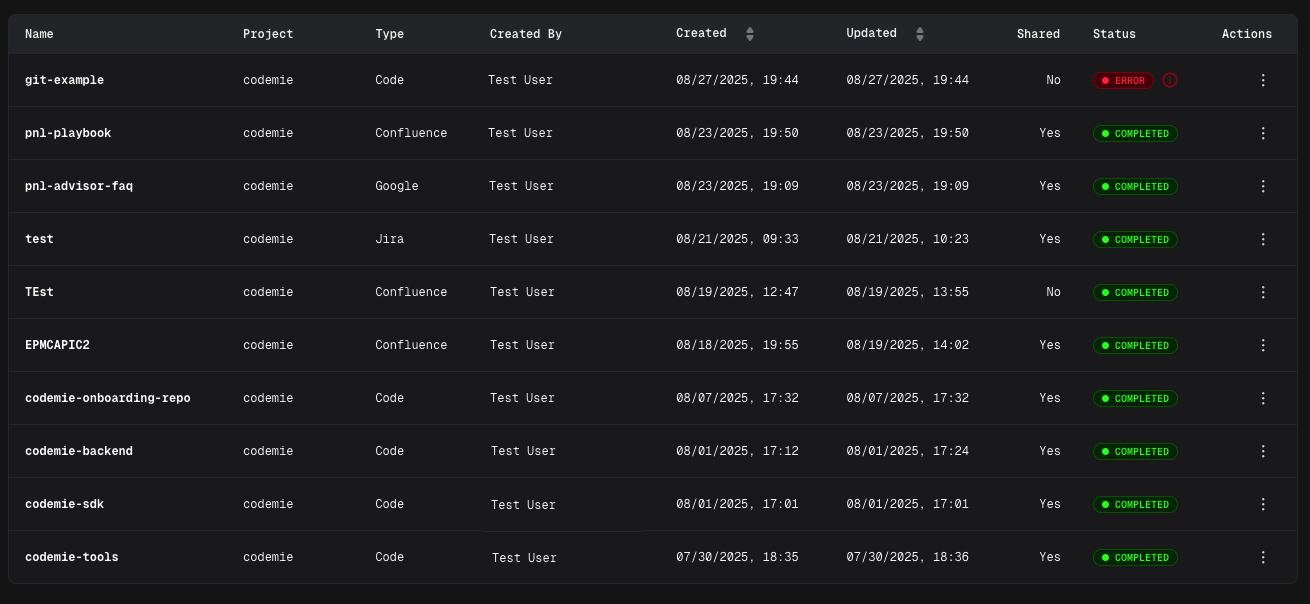
Now your Git repository is configured as a data source and ready to enhance your assistants with codebase knowledge.
Common Error Messages
Exit Code 128

Cause: General Git operation failure
Common reasons:
- Repository not found or inaccessible
- Authentication failed
- Network connectivity issues
- Invalid branch name
Solutions:
- Verify repository URL is correct
- Check Git integration credentials are valid
- Ensure branch name exists in the repository
- Test repository access manually
- Review integration permissions
Connection Timeout
Cause: Cannot establish connection to Git server
Solutions:
- Check network connectivity
- Verify Git server is accessible
- Review firewall settings
- Try again after a few minutes
Permission Denied
Cause: Insufficient access to repository
Solutions:
- Verify integration has read access to repository
- Check repository visibility settings (public/private)
- Update integration credentials
- Request access from repository owner
Using Git Data Source in Assistants
After successfully creating and indexing your Git data source, you can connect it to any assistant to provide access to your codebase.
Adding Data Source to Assistant
- Navigate to Assistants section
- Click + Create Assistant or edit an existing assistant
- In the Data Source Context section, click the dropdown menu
- Select your Git data source from the list
- Save the assistant configuration
Now your assistant can access and analyze code from the indexed repository, enabling it to:
- Answer questions about code structure and implementation
- Explain functions, classes, and modules
- Suggest code improvements and refactoring
- Help with debugging and troubleshooting
- Provide codebase-specific recommendations
Your Git repository is now configured and ready to enhance your assistants with codebase knowledge.