Add and Index Azure DevOps Wiki Data Source
Connect and index Azure DevOps Wiki pages, comments, and attachments as a data source.
An Azure DevOps Wiki data source lets assistants search and retrieve content from your wiki — including page text, discussion comments, and attached files. This guide walks you through the process of adding and indexing an Azure DevOps Wiki.
Prerequisites
This data source requires you to have at least one Azure DevOps integration added to AI/Run CodeMie. For more details, please refer to the Integrations Overview guidelines.
Before adding an Azure DevOps Wiki data source, ensure you have:
- Configured an Azure DevOps integration with a Personal Access Token
- Access to the Azure DevOps project and wiki you want to index
- Read permissions on wiki pages, comments, and attachments
Adding an Azure DevOps Wiki Data Source
Step-by-Step Process
1. Preparation
Before adding a new data source, create an Azure DevOps integration on the Integrations tab.
Refer to the Integrations Overview guidelines for detailed integration setup instructions.
2. Navigate to Data Sources
Navigate to the Data Sources section in AI/Run CodeMie.
3. Create New Data Source
Click the + Create Datasource button.
4. Configure the Data Source
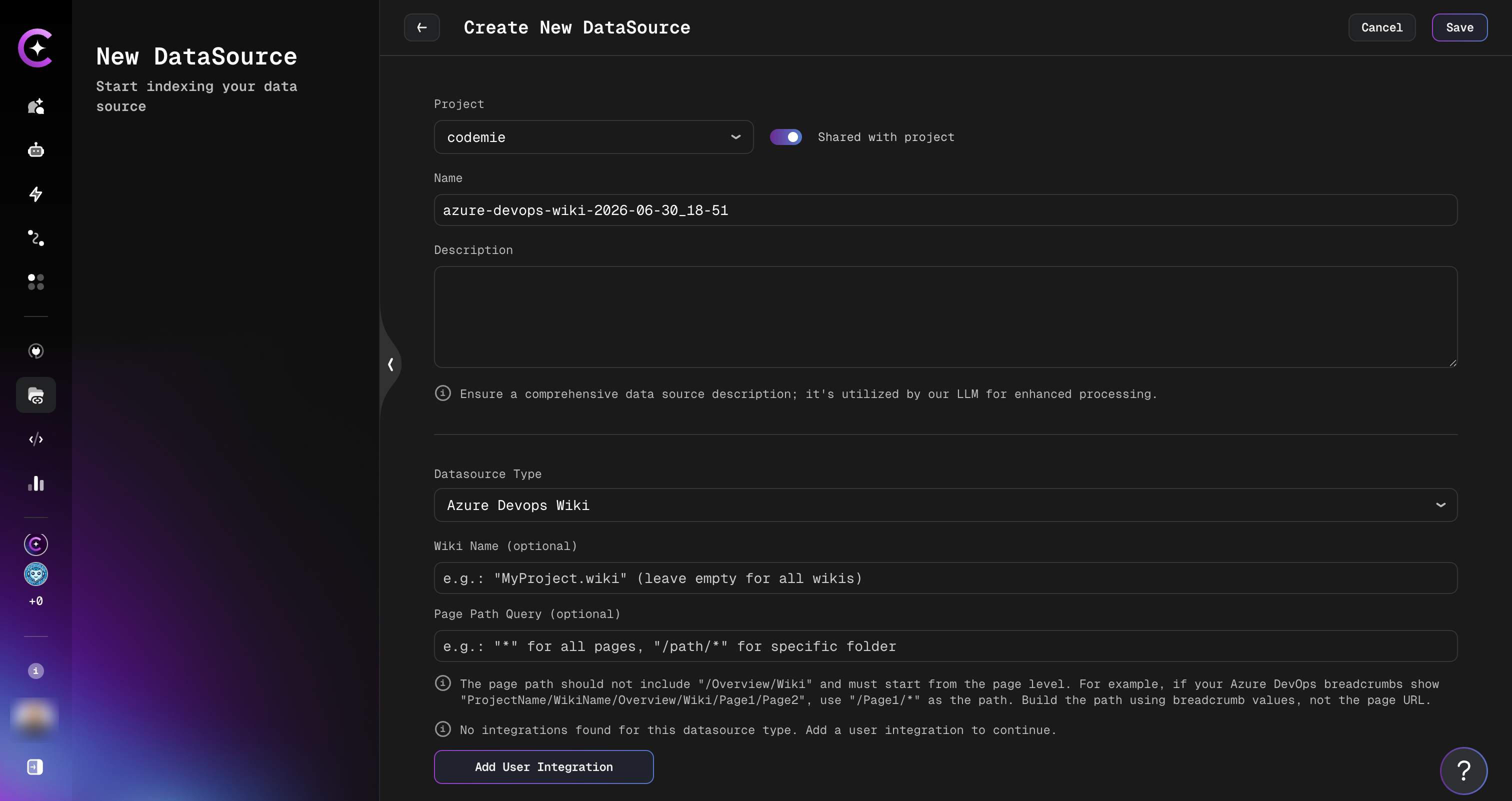
Fill in the required fields:
- Select Project: Choose the CodeMie project to associate with this data source.
- Name: A short alias for quick identification in the data source list.
- Description: Optional description of what this data source contains.
- Choose Datasource Type: Select Azure DevOps Wiki.
Configure the Azure DevOps Wiki-specific fields:
| Field | Required | Description |
|---|---|---|
| Wiki Name | Optional | Name of the wiki to index (e.g., MyProject.wiki). Leave empty to index all wikis in the project. |
| Page Path Query | Optional | Filter pages by path (e.g., * for all pages, /Architecture/* for a specific folder). |
| Integration | Required | Select your Azure DevOps integration. |
| Model used for embeddings | Required | Embedding model for indexing the content. |
The path must start from the page level — do not include the /Overview/Wiki prefix shown in Azure DevOps breadcrumbs. For example, if breadcrumbs show ProjectName/WikiName/Overview/Wiki/Page1/Page2, use /Page1/* as the path.
5. Configure Reindex Schedule (Optional)
In the Reindex Type section, configure automatic reindexing:
- No schedule (manual only) — Default, requires manual reindexing
- Every hour — For wikis with frequent updates
- Daily at midnight — For wikis with regular daily changes
- Weekly on Sunday at midnight — For less active wikis
- Monthly on the 1st at midnight — For archived wikis
- Custom cron expression — Enter a custom schedule (e.g.,
0 */4 * * *for every 4 hours)
6. Create Data Source
Click the + Create button. Indexing begins automatically.
What Gets Indexed
The data source indexes three types of content from each wiki page:
Page Content
The full markdown content of each wiki page is indexed as a separate document.
Comments
All discussion comments on each wiki page are indexed. Each comment includes the author's name, timestamp, and text. Comments from a single page are grouped into one document.
Attachments
Files attached to wiki pages are downloaded, text is extracted, and indexed. Supported file types:
| File Type | Extraction Method |
|---|---|
| Images (JPEG, PNG, GIF, BMP, WebP) | OCR via multimodal AI model |
| Text extraction | |
Word (.docx, .doc) | Text and image extraction |
Excel (.xlsx, .xls) | Markdown tables |
PowerPoint (.pptx, .ppt) | Text extraction |
Outlook (.msg) | Text extraction |
Image OCR and image-embedded document processing require a multimodal AI model to be configured in your CodeMie instance. If no multimodal model is available, image attachments are skipped.
Using the Azure DevOps Wiki Data Source in Assistants
After creating and indexing the data source, connect it to an assistant to enable wiki search.
- Navigate to the Assistants section.
- Click + Create Assistant or edit an existing one.
- In the Data Source Context section, select your Azure DevOps Wiki data source.
- Save the assistant configuration.
Your assistant can now answer questions using indexed wiki content, comments, and attachments.
For active interaction with wiki pages (creating, editing, searching), use the Azure DevOps Wiki tool in addition to the data source.