Azure DevOps Wiki
The Azure DevOps Wiki tool lets your CodeMie assistant read, create, modify, search, and manage wiki pages in your Azure DevOps project using natural language.
Prerequisites
Before adding the Wiki tool to an assistant, set up an AzureDevOps integration in CodeMie. See Azure DevOps — Configure Integration.
Add Wiki Tool to an Assistant
- Open Explore Assistant and click Create Assistant (or edit an existing one).
- Fill in the assistant details: project, name, description, and system instructions.
- In the Tools & Integrations section, expand Azure DevOps Wiki.
- Select the tools you want to enable (or check Select all).
- In the dropdown, select your AzureDevOps integration alias.
- Click Create or Save.
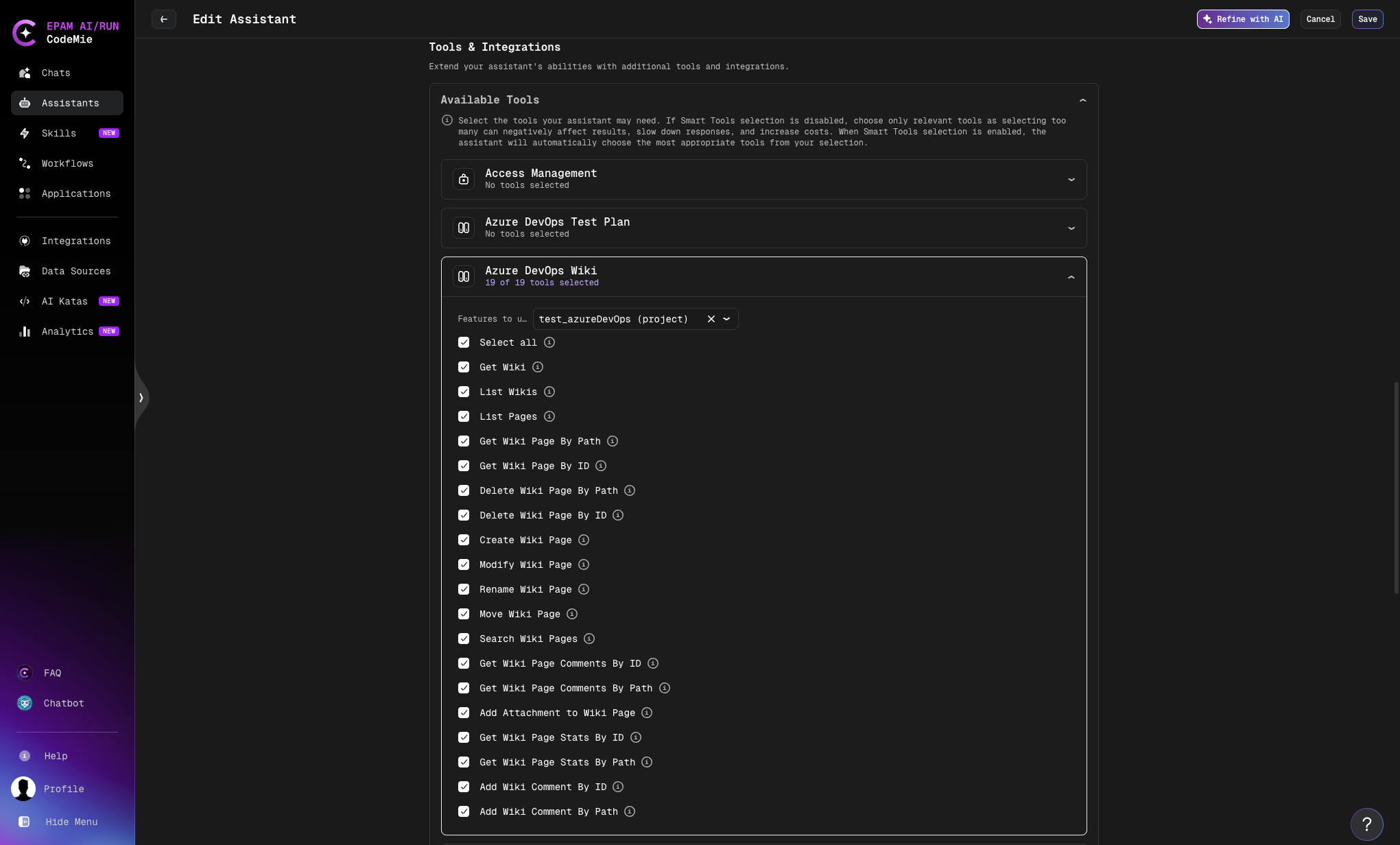
Available Operations
| Operation | Description |
|---|---|
| Get Wiki | Retrieve metadata for a specific wiki by ID or name |
| List Wikis | List all wikis in the project |
| List Pages | List pages under a given path with pagination support |
| Get Wiki Page By Path | Retrieve wiki page content by its path (e.g., /Parent/Child/Page) |
| Get Wiki Page By ID | Retrieve wiki page content by its numeric ID |
| Delete Wiki Page By Path | Delete a page identified by path |
| Delete Wiki Page By ID | Delete a page identified by numeric ID |
| Create Wiki Page | Create a new page under a specified parent path |
| Modify Wiki Page | Update the content of an existing page |
| Rename Wiki Page | Rename a page while preserving its content and history |
| Move Wiki Page | Move a page to a different location in the hierarchy |
| Search Wiki Pages | Full-text search across all wiki pages (up to 100 results) |
| Get Wiki Page Comments By ID | Retrieve comments for a page by its numeric ID |
| Get Wiki Page Comments By Path | Retrieve comments for a page by its path |
| Add Attachment to Wiki Page | Upload a file attachment to a wiki page (max 19 MB) |
| Add Wiki Comment By ID | Add a comment to a wiki page identified by its numeric ID |
| Add Wiki Comment By Path | Add a comment to a wiki page identified by its path |
| Get Wiki Page Stats By ID | Get view statistics for a page by ID (up to 30 days) |
| Get Wiki Page Stats By Path | Get view statistics for a page by path (up to 30 days) |
Wiki identifiers can be either the wiki ID or the wiki name (e.g., MyProject.wiki). Page paths must start from the page level — do not include the /Overview/Wiki prefix shown in Azure DevOps breadcrumbs.
Page Path Format
Azure DevOps wiki page paths follow a hierarchical structure. Use the page hierarchy from your wiki, not the URL:
# ✅ Correct — page path
/Architecture/Backend/API-Design

# ❌ Incorrect — includes breadcrumb prefix
/Overview/Wiki/Architecture/Backend/API-Design
Use "/" as the path for the root page or to list top-level pages.
Usage Examples
Once the assistant is set up, interact with it using natural language:
Find a wiki page:
"Show me the content of the API Design wiki page under Architecture/Backend"
Create a new page:
"Create a new wiki page called 'Deployment Checklist' under /Operations with the following content: ..."
Search the wiki:
"Search the wiki for pages about authentication"
Update an existing page:
"Update the Onboarding page — add a section about the new SSO setup"
Move a page:
"Move the 'Old Processes' page to the /Archive section"