Chargeback and Cost Centers
Part of the CodeMie Enterprise package, and may not be enabled on every deployment. If this capability is missing from the UI described below, contact the CodeMie platform administrator. See all Enterprise features.
A project budget decides how much a project may spend. Chargeback and cost centers decide who pays for it.
- Chargeback marks a project's spend as billable, so it can be recovered from the team that incurred it rather than absorbed centrally.
- A cost center groups several projects — a program, a department, or a client engagement — so their combined AI spend settles on one bill.
The two are independent of enforcement: neither blocks a request or changes a limit. They determine where the spend is attributed for internal billing.
Chargeback
Enabling Chargeback
Chargeback is configured on the project's budget.
- Go to Administration → Projects Management and select the project.
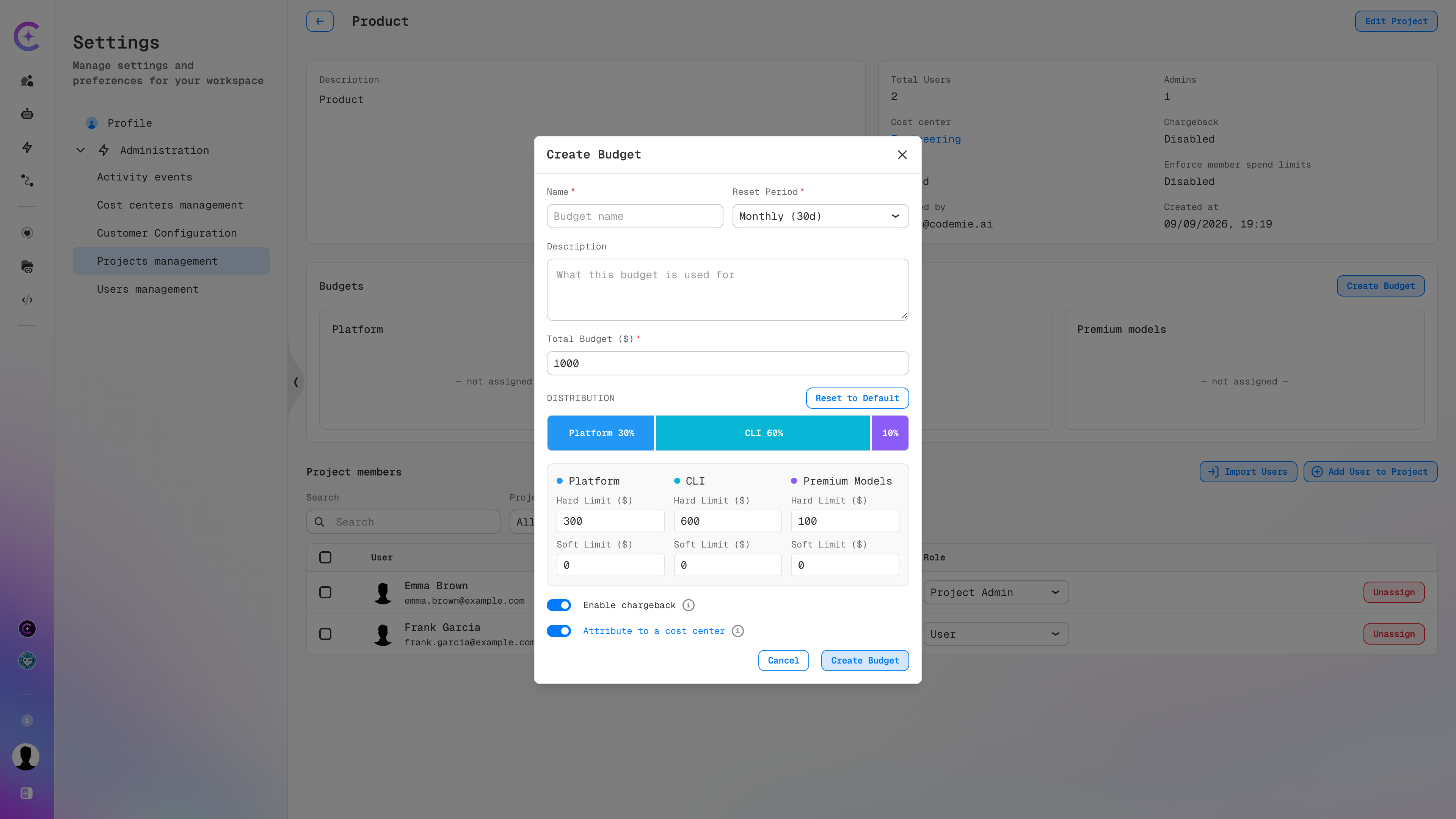
- Open the budget dialog — Create Budget for a new budget, or Manage Budget for an existing one.
- Switch on Enable chargeback.
- Optionally switch on Attribute to a cost center, which appears once chargeback is enabled.
- Save the budget.
Attribution Targets
| Setting | Where the spend is billed |
|---|---|
| Enable chargeback off | Spend is not tracked for internal billing |
| Enable chargeback on | Spend is billed to the project's own billing code |
| Enable chargeback on, Attribute to a cost center on | Spend rolls up to the cost center assigned to the project instead of the project's own code |
Attribute to a cost center only takes effect when the project has a cost center assigned. Assign one through Edit Project → Cost center. See Assigning a Project to a Cost Center.
The current state is visible on the project page without opening the budget: the information panel
shows Chargeback as Enabled or Disabled, alongside the Cost center the project belongs
to.
Cost Centers
A cost center is a grouping label that aggregates the spend of every project assigned to it. It holds no budget of its own — limits live on the projects, and the cost center simply adds up what they spend.
This keeps the two concerns separate: a project budget controls consumption, while a cost center controls reporting and billing.
Managing Cost Centers
Path: Profile → Settings → Administration → Cost centers management
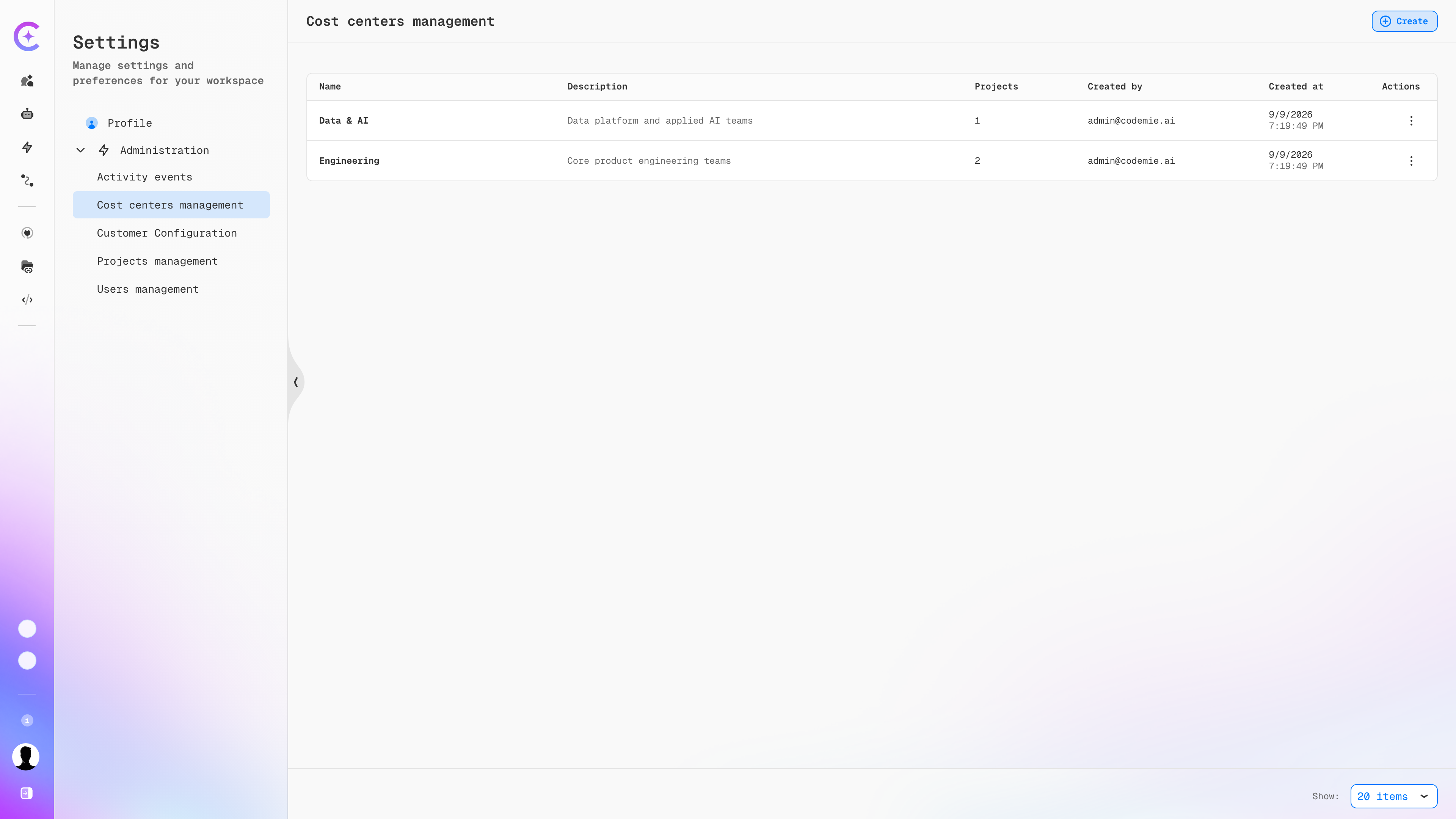
The list shows every cost center with its description, the number of projects assigned to it, and creation details.
| Column | Description |
|---|---|
| Name | Cost center identifier |
| Description | What the cost center covers |
| Projects | Number of projects currently assigned to it |
| Created by | User who created the cost center |
| Created at | Creation timestamp |
| Actions | Edit and delete the cost center |
Creating a Cost Center
- Go to Administration → Cost centers management.
- Click Create.
- Enter a Name and a Description.
- Save.
Cost center names must match the pattern configured by COST_CENTER_NAME_PATTERN, which defaults to
two lowercase alphanumeric segments joined by a hyphen (for example, platform-core). Names that do
not match are rejected. See Cost Center configuration.
Assigning a Project to a Cost Center
- Open the project under Administration → Projects Management.
- Click Edit Project.
- Select the target cost center in the Cost center field.
- Click Save.
The project page then shows the cost center in its information panel, and the Projects count on the cost center increases. A project belongs to at most one cost center at a time; clearing the field removes the association.
Assigning a cost center does not by itself redirect billing. The project's budget must also have both Enable chargeback and Attribute to a cost center switched on for its spend to roll up.
Putting It Together
A typical rollout across a department:
- Create a cost center for the department under Cost centers management.
- Give each project in the department a budget with the categories and limits that fit the team.
- Assign each project to the cost center through Edit Project.
- On each project's budget, switch on Enable chargeback and Attribute to a cost center.
Every project then carries its own enforced limit, while the department receives a single combined bill for their AI spend.
See Also
- Project Budgets — creating budgets, tracking spend, and member allocations
- Budget Management — budget types, categories, and priority
- API Configuration Reference — the
COST_CENTER_NAME_PATTERNsetting