AI Champions Leaderboard
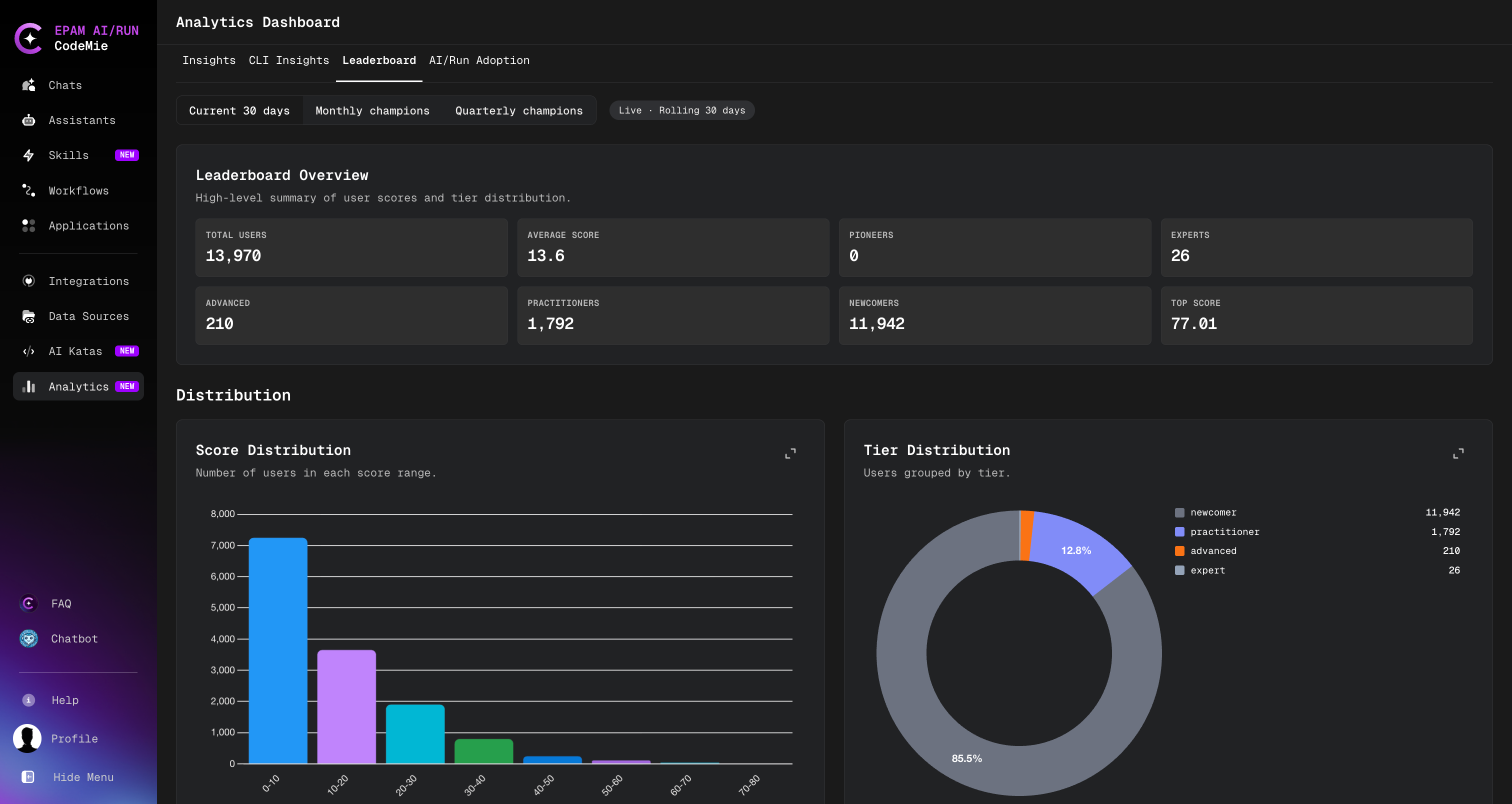
The AI Champions Leaderboard ranks platform users by their overall AI engagement score, calculated across six dimensions of platform activity. It gives platform admins a structured view of AI adoption patterns and helps identify top contributors across the organization.
The full leaderboard is visible to platform admins only. Regular users can view their own profile and score, but cannot see other users' rankings.
Accessing the Leaderboard
- Click the Analytics icon in the left sidebar navigation.
- Select the Leaderboard tab at the top of the Analytics Dashboard.
Admins see the full ranked table with filters and aggregated statistics. Regular users land directly on their personal score card.
Scoring Model
Each user receives a total score from 0 to 100, calculated as a weighted sum of six dimension scores.
| # | Dimension | Weight | What it measures |
|---|---|---|---|
| D1 | Core Platform Usage | 20% | Active days, conversations, assistants used, platform breadth |
| D2 | Core Platform Creation | 20% | Assistants, skills, and data sources created; asset maturity |
| D3 | Workflow Usage | 10% | Workflow execution volume, success rate, repeat usage |
| D4 | Workflow Creation | 10% | Workflows built, structural complexity, originality |
| D5 | CLI & Agentic Engineering | 30% | CLI sessions, repositories, code output, delivery efficiency |
| D6 | Impact & Knowledge | 10% | Asset reuse by others, knowledge sharing, kata completions |
D5 carries the highest weight, reflecting that agentic, code-level AI usage is the most advanced form of platform engagement.
Users with a total score of 0 are excluded from the leaderboard entirely. Only active users appear in rankings.
Tiers
Users are assigned a tier based on their total score:
| Tier | Min Score | Description |
|---|---|---|
| Pioneer | 80+ | Exceptional breadth and depth across all dimensions |
| Expert | 65–79 | Strong engagement across most platform areas |
| Advanced | 45–64 | Consistent usage with meaningful creation activity |
| Practitioner | 25–44 | Regular platform user with growing engagement |
| Newcomer | < 25 | Early-stage user just getting started |
Intent Classification
In addition to a tier, each user is assigned an intent label that reflects their primary usage pattern:
| Intent | Description |
|---|---|
| SDLC Unicorn | Strong across platform usage, creation, workflows, and CLI engineering |
| Developer | CLI-dominant usage — primarily uses CodeMie through the command-line agent |
| Workflow Architect | Primarily builds and creates workflows |
| Workflow User | Primarily executes and consumes workflows |
| Platform Builder | Focused on creating assistants, skills, and data sources |
| AI User | Primarily uses the platform through web conversations and assistants |
| Explorer | Very low overall activity; early exploration stage |
Leaderboard Views
The leaderboard supports three time-based views, selectable from the view switcher at the top of the tab:
| View | Description |
|---|---|
| Current 30 days | Rolling 30-day window, recomputed nightly |
| Monthly champions | Final snapshot for a completed calendar month |
| Quarterly champions | Final snapshot for a completed quarter |
Monthly and quarterly views are archived snapshots — they reflect the state at the end of that period and do not change.
Admin Capabilities
Platform admins have access to additional leaderboard functionality:
Browsing and Filtering
The leaderboard table supports:
- Search by user name or email
- Filter by tier or intent
- Sort by rank, total score, username, or tier level
User Detail View
Click any user row to open their detailed profile, which shows:
- Scores and component breakdowns for all six dimensions
- Assigned tier and intent
- Active projects
Leaderboard Summary
The top of the Leaderboard tab displays aggregated statistics:
- Total scored users
- Average score across the organization
- User count per tier
- Top score in the current period
Configuration
The leaderboard feature is controlled by the following environment variables, set by the platform administrator:
| Variable | Default | Description |
|---|---|---|
LEADERBOARD_ENABLED | false | Enables the nightly computation job |
LEADERBOARD_SCHEDULE | 0 2 * * * | Cron expression for the scheduled run (UTC) |
LEADERBOARD_PERIOD_DAYS | 30 | Rolling window size in days |
If LEADERBOARD_ENABLED is false, the leaderboard tab is not available and the nightly
job does not run. Contact your platform administrator to enable this feature.