Custom Applications (Hosted Applications)
Hosted applications let CodeMie users upload a small static web page (one HTML file or a ZIP of a prebuilt static build), share it, and open it inside CodeMie on the Applications page. The feature is intended for presentations: slides, reports, and demos.
CodeMie only stores and serves static files. Uploaded pages run in the viewer's browser on a separate content domain, so they cannot access CodeMie cookies, tokens, or data. They also cannot make network requests, submit forms, open dialogs or popups, or load external resources.
While the feature is off, the Applications page shows only Platform apps and no hosted background work runs.
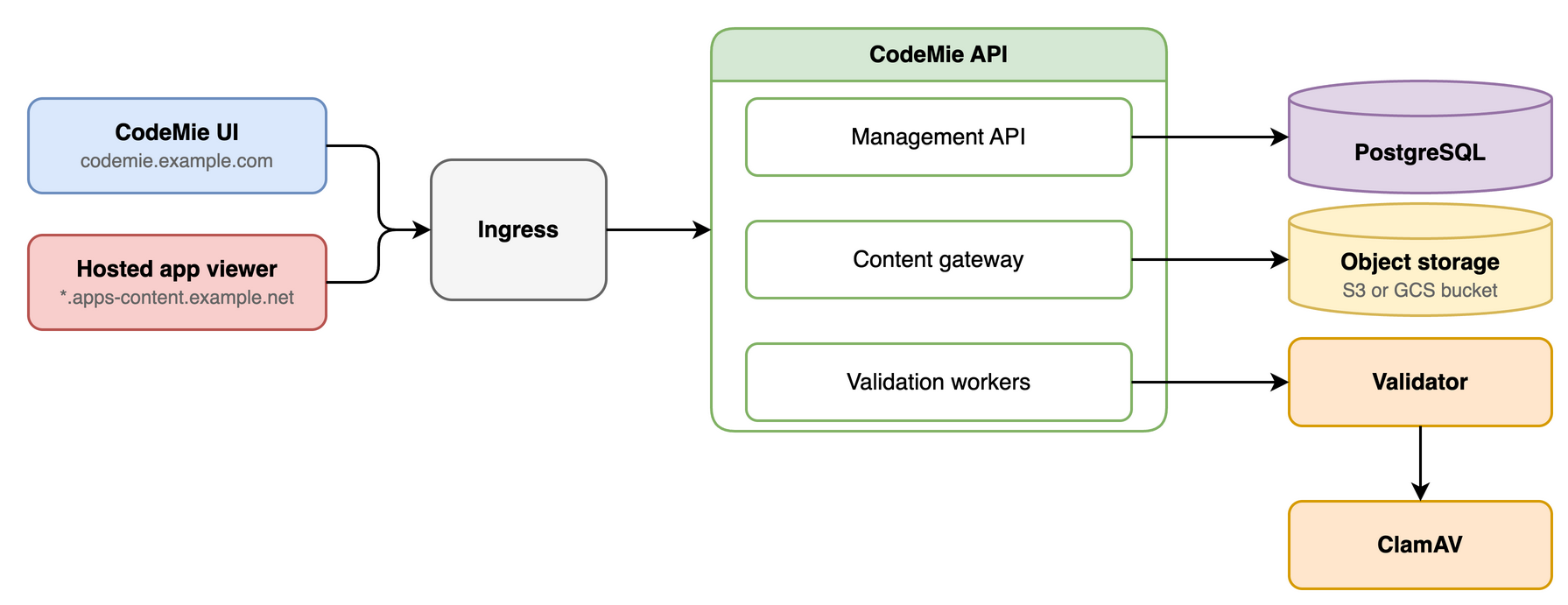
Architecture
| Component | Role |
|---|---|
| CodeMie API | Management API, content gateway, and validation workers. One process serves both hosts by Host header. |
| Content domain | A separate registrable domain. Each version is served from v-<version ID>.<content domain>, and its viewer frame from w-<version ID>.<content domain>. |
| Validator | A private deployment that checks every upload in a sandboxed parser. Exactly one replica. |
| ClamAV | A separate private deployment that scans uploads for malware on behalf of the validator. |
| Object storage | A dedicated private S3 or GCS bucket for the validated files. |
| PostgreSQL | Applications, versions, sharing, sessions, and the job queue. |
Prerequisites
| Area | Requirement |
|---|---|
| Content domain | A separate registrable domain, for example apps-content.example.net when CodeMie runs on example.com. Never a subdomain of CodeMie or the identity provider. |
| DNS and TLS | Wildcard DNS *.<content domain> to the ingress and a wildcard certificate. |
| Identity | ENABLE_USER_MANAGEMENT=true. Any installed IDP_PROVIDER works. |
| Storage | A dedicated private bucket, with FILES_STORAGE_TYPE set to aws (S3) or gcp (GCS). Azure is not supported yet. |
| Validator nodes | Linux amd64 nodes with Landlock ABI 3 or later (normally Linux 6.2 or later). On GKE, a dedicated Ubuntu node pool (not Autopilot). See Validator nodes. |
Configuration
Feature switch and API settings
- Feature switch. Enable the
features:hostedApplicationscomponent in the customer configuration. It controls the UI and the API together. See Customer Feature Configuration. - API settings. The
HOSTED_APPS_*variables are listed in the API Configuration Reference.
If the feature is enabled but the deployment cannot run it safely, it stays off and the API logs Hosted applications are enabled but unavailable: <reason>. The reason names the failing setting.
UI
The CodeMie UI needs no configuration of its own. It reads features:hostedApplications from GET /v1/config and gets the content address from the API when a user opens an application. Two things to check:
FRONTEND_URLon the API must match the address users open in the browser.- If your edge adds a
Content-Security-Policyto the UI host, itsframe-srcmust allowhttps://*.<content domain>.
Validator and ClamAV
The validator and ClamAV are deployed by the CodeMie Helm chart, as two separate deployments. Both are off by default. Enable them with the features.tools.hosted-apps block of the chart values, using the validator image supplied with the release:
features:
  tools:
    hosted-apps:
      enabled: true
      validator:
        image:
          repository: <registry>/codemie-hosted-validator
      ingress:
        host: "*.<content domain>"
| Value | Description |
|---|---|
enabled | Renders the validator, ClamAV, and content Ingress. Default false. |
validator.image.repository | Validator image. The tag defaults to the API image tag. |
ingress.host | Required. Wildcard host of the content Ingress, for example *.apps-content.example.net. |
ingress.enabled, ingress.ingressClassName, ingress.tls, ingress.annotations | Optional. Content Ingress is enabled by default with class nginx. Put the wildcard certificate under tls. |
namespace.name, namespace.create | Namespace of the validator and ClamAV (default codemie-hosted-apps), and whether the chart creates it. |
clamdConfig.existingConfigMap | Optional. Use your own ConfigMap (key clamd.conf) instead of the one the chart creates. |
The validator Service is codemie-hosted-apps-validator and runs in the namespace.name namespace, which is separate from the API by default. Set HOSTED_APPS_VALIDATOR_URL to the full service name, http://codemie-hosted-apps-validator.<namespace>.svc:8091, and create the codemie-hosted-applications Secret in the validator namespace as well, with the key validator-key (the API reads HOSTED_APPS_VALIDATOR_KEY from the same value). The chart sets the validator and ClamAV environment variables itself.
Validation results live in the validator instance that produced them. Do not scale the validator above one replica. While it restarts, uploads wait and viewing is not affected.
Validator nodes
The validator parses uploads in a kernel sandbox (Landlock and seccomp) and exits at startup if the node cannot enforce it. On such a node the pod crash-loops with Parser isolation is not enforced on this node.
Run the validator on Linux amd64 nodes with Landlock ABI 3 or later (normally kernel 6.2 or later). On GKE, the default Container-Optimized OS image is built without Landlock, so place the validator on a dedicated Ubuntu node pool with the validator.nodeSelector and validator.tolerations chart values. The API and ClamAV can stay on the default nodes. GKE Autopilot nodes always run Container-Optimized OS, where Landlock is disabled, so the validator cannot run on Autopilot; use a GKE Standard node pool.
Ingress
- Content hosts. The chart creates the content Ingress
codemie-hosted-apps-contentwhenfeatures.tools.hosted-apps.enabledandingress.enabledare true. It must route*.<content domain>, and only that, to the CodeMie API Service. KeepHostunchanged. Do not add authentication, rewrites, caching, or a CDN in front of it, and do not log request bodies, cookies, orAuthorizationheaders. - Management host. Uploads carry up to 100 MiB: set the request body limit to at least
110mand read and send timeouts to at least900seconds. The default chart setsproxy-read-timeout: "600", so raise it and addproxy-send-timeout.
Storage
- Use a dedicated private bucket for each deployment. Versioning off, public access blocked.
- S3 needs
s3:GetObject,s3:PutObject,s3:DeleteObject,s3:ListBucket,s3:ListBucketMultipartUploads,s3:AbortMultipartUpload, ands3:ListMultipartUploadParts. Add a lifecycle rule that aborts incomplete multipart uploads after 1 day. - GCS needs
roles/storage.objectUseron the bucket. Add a lifecycle rule that deletes objects under.staging/and.fences/after 1 day. - Never delete the
.hosted/storage-idobject. Back up the database and the bucket together.
Rollout
- Create the DNS record, wildcard certificate, bucket, and Secret. On GKE, also create the validator node pool.
- Raise the management ingress limits.
- Enable
features.tools.hosted-appsin the chart values and add the API settings. - Enable
features:hostedApplicationsin the customer configuration. - Check that the API log has no
Hosted applications are enabled but unavailablewarning, that the validator and ClamAV deployments are ready, and thatGET /v1/configreports the feature as enabled. - Upload a test page, open it, share it with a second user, and sign out.
Operations
To take an application down immediately, a platform administrator can suspend it from the application's page (Suspend) or through the API. A suspended application disappears for everyone except its owner, project administrators, and platform administrators, and it cannot be activated, published, or shared. Existing shares are kept and apply again after the application is reinstated.
curl -X POST "$CODEMIE_API/v1/admin/hosted-applications/<application id>/security/suspend" \
  -H "Authorization: Bearer $ADMIN_TOKEN" -H "Content-Type: application/json" \
  -H "Idempotency-Key: $(uuidgen)" -d '{"reason": "Phishing report"}'
Use reinstate instead of suspend to clear a suspension. Reinstating needs an If-Match header with the current application ETag, and the administrator who reinstates cannot be the application's creator. The body can name another accepted version_id to make active, with delete_previous to remove the previous version. To stop all hosted content, turn the feature off and restart the API.
More Information
The repository file hosted-applications/README.md is the full operations runbook. It covers secret rotation, backup and restore, metrics, identity details, and residual risks. For end users, see Hosted Applications.