AWS AgentCore
AWS AgentCore is an enterprise feature. Contact EPAM to verify it is enabled for the deployment.
AWS AgentCore integration enables the discovery of AWS-hosted agent runtimes, browsing their endpoints, and installing those endpoints as assistants directly within the platform — without writing any integration code.
Prerequisites
An active AWS integration must be configured before any AgentCore runtimes are visible. See the AWS Integration guide.
Navigating to AgentCore Runtimes
To access AgentCore management, open Settings from the left navigation bar and navigate to External Vendors → AWS Integration.
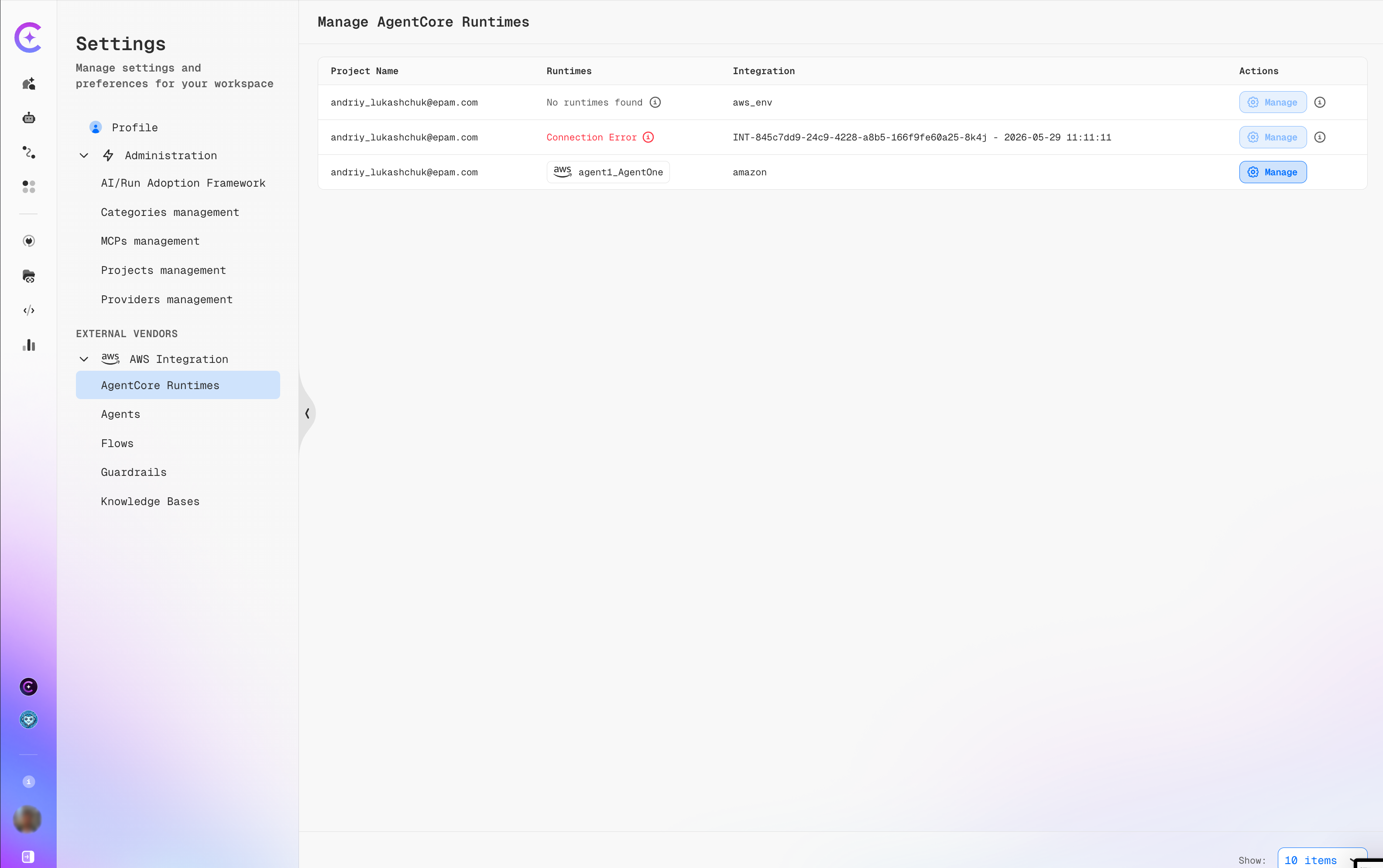
Once an AWS integration is configured, the Manage AgentCore Runtimes table reflects its discovery status:
| Column | Description |
|---|---|
| Project Name | The workspace user/project the integration belongs to. |
| Runtimes | Discovery result — shows a runtime name (with the AWS logo) when found, No runtimes found when the integration is healthy but returns nothing, or Connection Error (red) when credentials or region are misconfigured. |
| Integration | The integration identifier and timestamp, or a friendly alias such as aws_env or amazon. |
| Actions | Manage — opens the integration configuration to update credentials or remove it. The ⓘ icon shows integration metadata. |
A Connection Error status means the platform cannot reach the AWS endpoint with the stored credentials. Re-open Manage and verify the access key, secret, and region.
Click AgentCore Runtimes to open the runtime list for the active project.
Browsing Runtimes
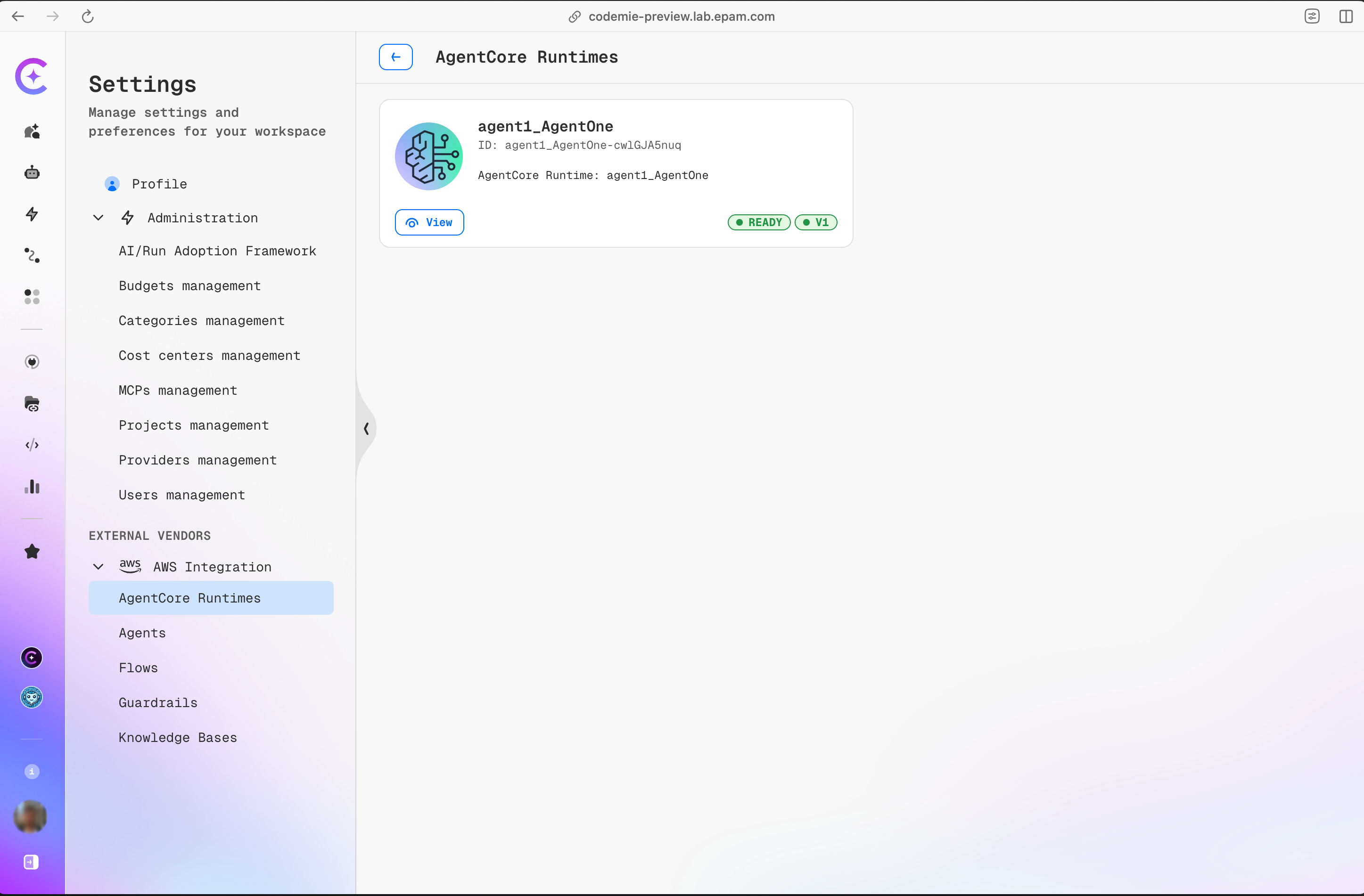
The AgentCore Runtimes page shows one card per runtime discovered from the connected AWS account.
Each card displays:
| Field | Meaning |
|---|---|
| Name | Human-readable runtime name as defined in AWS. |
| ID | Stable unique identifier for the runtime. |
| AgentCore Runtime | The underlying AgentCore resource name in AWS. |
| Status badge | Lifecycle state — READY means the runtime is accepting traffic. |
| Version badge | The runtime schema/protocol version. |
Click View on any card to open the Runtime Details page.
Viewing Runtime Details
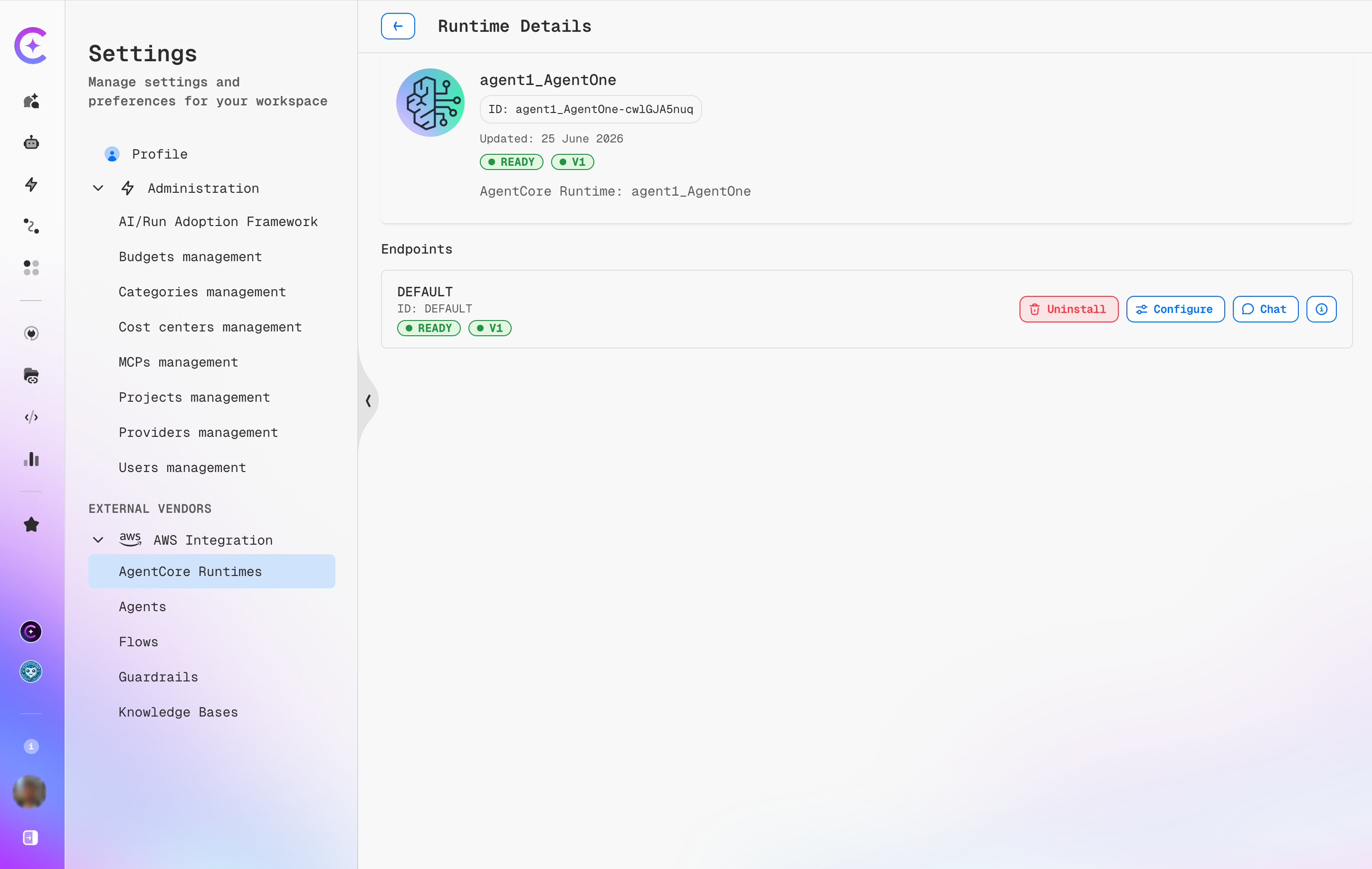
The Runtime Details page provides a full view of a single runtime and all its endpoints.
Header
| Field | Description |
|---|---|
| Name | Runtime name as defined in AWS. |
| ID | Stable unique runtime identifier. |
| Last updated | Date the runtime record was last refreshed. |
| Status | Lifecycle state of the runtime. |
| Version | Protocol version. |
| Source label | AgentCore Runtime: <runtime-name> |
Endpoints
Each runtime exposes one or more named endpoints. For each endpoint the table shows:
| Column | Meaning |
|---|---|
| Name | Endpoint label as defined in AWS (can be environment-specific). |
| ID | Stable endpoint identifier. |
| Status | Whether this specific endpoint is live. |
| Version | Protocol version of the endpoint. |
Endpoint Actions
| Button | Description |
|---|---|
| Uninstall | Removes the assistant previously installed from this endpoint. Visible only when the endpoint is already installed. |
| Configure | Opens the Configure endpoint dialog to install or update the assistant mapping. |
| Chat | Opens a quick chat session directly against this endpoint for testing. |
| ⓘ | Shows raw endpoint metadata (IDs, ARNs, region info). |
Installing an Endpoint as an Assistant
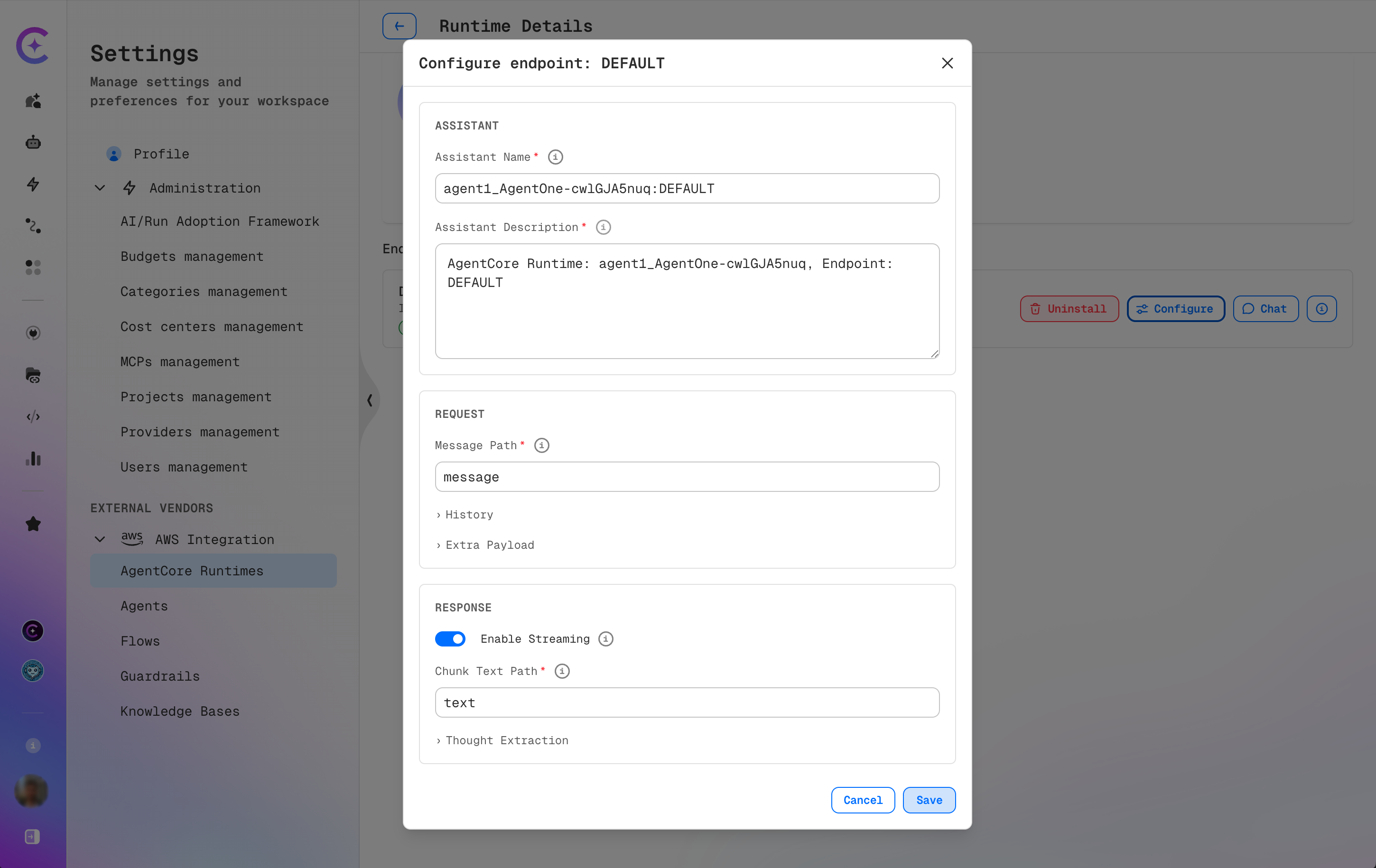
Clicking Configure on any endpoint opens the Configure endpoint: <ENDPOINT_NAME> dialog. Saving this dialog installs — or reconfigures — the endpoint as a named assistant available across the workspace.
Assistant
| Field | Required | Default | Description |
|---|---|---|---|
| Assistant Name | No | <runtimeId>:<endpointId> | Display name in the assistant picker. |
| Assistant Description | No | Auto-generated | Description shown in the assistant list. |
Request
Message Path
| Field | Required | Default | Description |
|---|---|---|---|
| Message Path | No | message | Dot-notation path where the user message is placed in the request body. For example, message produces { "message": "Hello" }; input.text produces { "input": { "text": "Hello" } }. |
History (expandable)
Omit this section entirely to never send conversation history to the endpoint.
| Field | Required | Default | Description |
|---|---|---|---|
| History Path | Yes | — | Dot-notation path where the turns array is injected (e.g. messages). |
| Role Path | No | role | Field name for the role inside each turn object. |
| Message Path | No | content | Field name for the message text inside each turn object. |
| User Role | No | user | Role label used for user turns. |
| Assistant Role | No | assistant | Role label used for all non-user turns. |
Extra Payload (expandable)
A static JSON object whose keys are merged into every request body. Useful for runtime-specific parameters such as session_id, locale, or model overrides. Must be a flat or nested object — arrays and scalar values are rejected.
Response
| Field | Required | Default | Description |
|---|---|---|---|
| Enable Streaming | No | Off | When enabled, the platform reads the response as an SSE stream and displays tokens incrementally. When disabled, the platform reads a single JSON body. |
| Response Text Path | Yes (when streaming off) | — | Dot-notation path to the answer text in the full response body (e.g. output). |
| Chunk Text Path | Yes (when streaming on) | — | Dot-notation path to the answer text in each SSE chunk (e.g. delta.content). |
Thought Extraction (expandable)
If the AgentCore runtime surfaces chain-of-thought reasoning separately from the final answer, configure extraction here.
| Field | Required | Description |
|---|---|---|
| Text Path | Yes | Dot-notation path to the thought text. |
| Thoughts Path | No (non-streaming) | Path to an array of thought objects; Text Path, Name Path, and Args Path are resolved per item in the array. |
| Name Path | No | Path to the tool or agent name within each thought object. |
| Args Path | No | Path to the tool arguments within each thought object. |
Saving
Click Save to apply. The endpoint status on the Runtime Details page reflects the installed assistant immediately. To update an already-installed endpoint, click Configure again — the dialog reopens pre-populated with the current values. Click Cancel to discard changes.
AgentCore Agent Implementation Examples
The examples below show the exact request and response shapes the AgentCore agent must implement for each configuration.
Streaming — with history and thought extraction
Configure endpoint settings
| Field | Value |
|---|---|
| Message Path | message |
| History Path | messages |
| Role Path | role |
| History Message Path | content |
| User Role | user |
| Assistant Role | assistant |
| Enable Streaming | On |
| Chunk Text Path | delta.text |
| Thought Extraction — Text Path | delta.thinking |
| Thought Extraction — Active Path | delta.thinking_active |
Request body sent to AgentCore
{
  "message": "What is the capital of France?",
  "messages": [
    { "role": "user", "content": "Hi there" },
    { "role": "assistant", "content": "Hello! How can I help?" }
  ]
}
SSE chunks the agent must return
{ "delta": { "text": null, "thinking": "User is asking geography.", "thinking_active": true } }
{ "delta": { "text": null, "thinking": null, "thinking_active": false } }
{ "delta": { "text": "The capital of France is Paris.", "thinking": null, "thinking_active": false } }
Non-streaming — with history and thought extraction
Configure endpoint settings
| Field | Value |
|---|---|
| Message Path | input.text |
| History Path | input.history |
| Role Path | role |
| History Message Path | content |
| User Role | human |
| Assistant Role | bot |
| Enable Streaming | Off |
| Response Text Path | output.answer |
| Thought Extraction — Thoughts Path | output.thoughts |
| Thought Extraction — Text Path | content |
| Thought Extraction — Name Path | tool |
| Thought Extraction — Args Path | input |
Request body sent to AgentCore
{
  "input": {
    "text": "What is the capital of France?",
    "history": [
      { "role": "human", "content": "Hi there" },
      { "role": "bot", "content": "Hello! How can I help?" }
    ]
  }
}
Response body the agent must return
{
  "output": {
    "answer": "The capital of France is Paris.",
    "thoughts": [
      { "tool": "knowledge_base", "input": { "query": "capital France" }, "content": "Retrieved: Paris is the capital." },
      { "tool": null, "input": null, "content": "Sufficient confidence, no further lookup needed." }
    ]
  }
}