On-VM Deployment Architecture
CodeMie On VM deploys the full AI/Run CodeMie platform on a single virtual machine using Docker Compose. It provides the same core functionality as the full Kubernetes deployment but with minimal infrastructure overhead, and is designed for proof-of-concept and demo environments rather than production workloads.
Application Architecture
All CodeMie services run as Docker containers on the VM, orchestrated by Docker Compose. This layer is identical regardless of the underlying cloud provider.
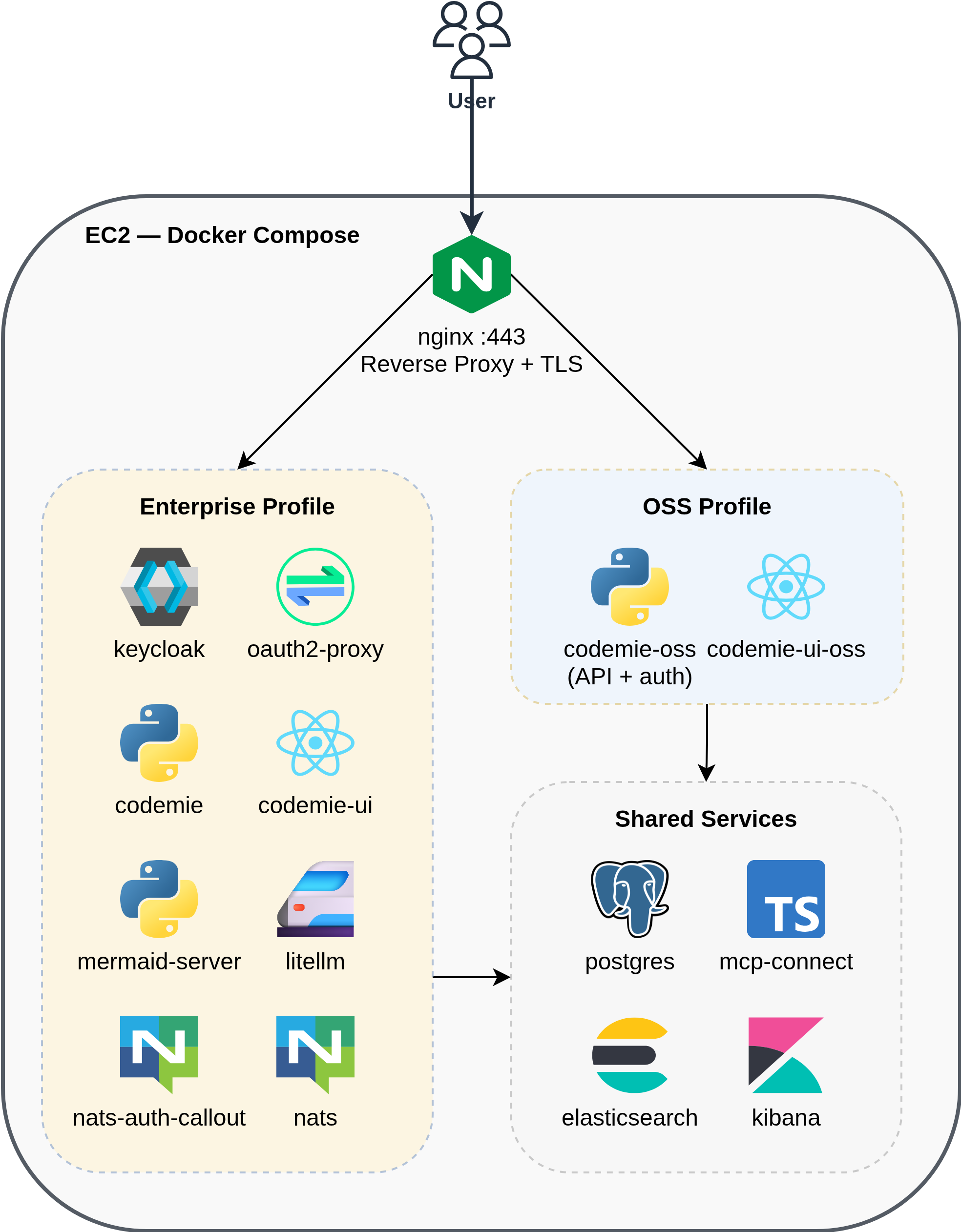
Services by Profile
Shared services (both profiles):
| Service | Image | Purpose |
|---|---|---|
| postgres | pgvector/pgvector:pg17 | Primary database for application data |
| elasticsearch | elasticsearch:8.x | Document storage and search for Data Sources |
| kibana | kibana:8.x | Log visualization and analytics for Elasticsearch |
| mcp-connect | codemie-mcp-connect-service | Connector for MCP servers |
| nginx | nginx:1.31-alpine | Reverse proxy, TLS termination |
OSS profile:
| Service | Purpose |
|---|---|
| codemie-oss | API server with built-in local authentication |
| codemie-ui-oss | Web frontend |
Enterprise profile:
| Service | Purpose |
|---|---|
| codemie | API server |
| codemie-ui | Web frontend |
| keycloak | Identity provider (SSO, OIDC) |
| oauth2-proxy | Authentication proxy in front of nginx |
| litellm | LLM proxy for model routing and key management |
| nats | Messaging for plugin engine |
| nats-auth-callout | NATS authentication service |
| mermaid-server | Diagram rendering |
Infrastructure Overview
- AWS
- Azure
- GCP
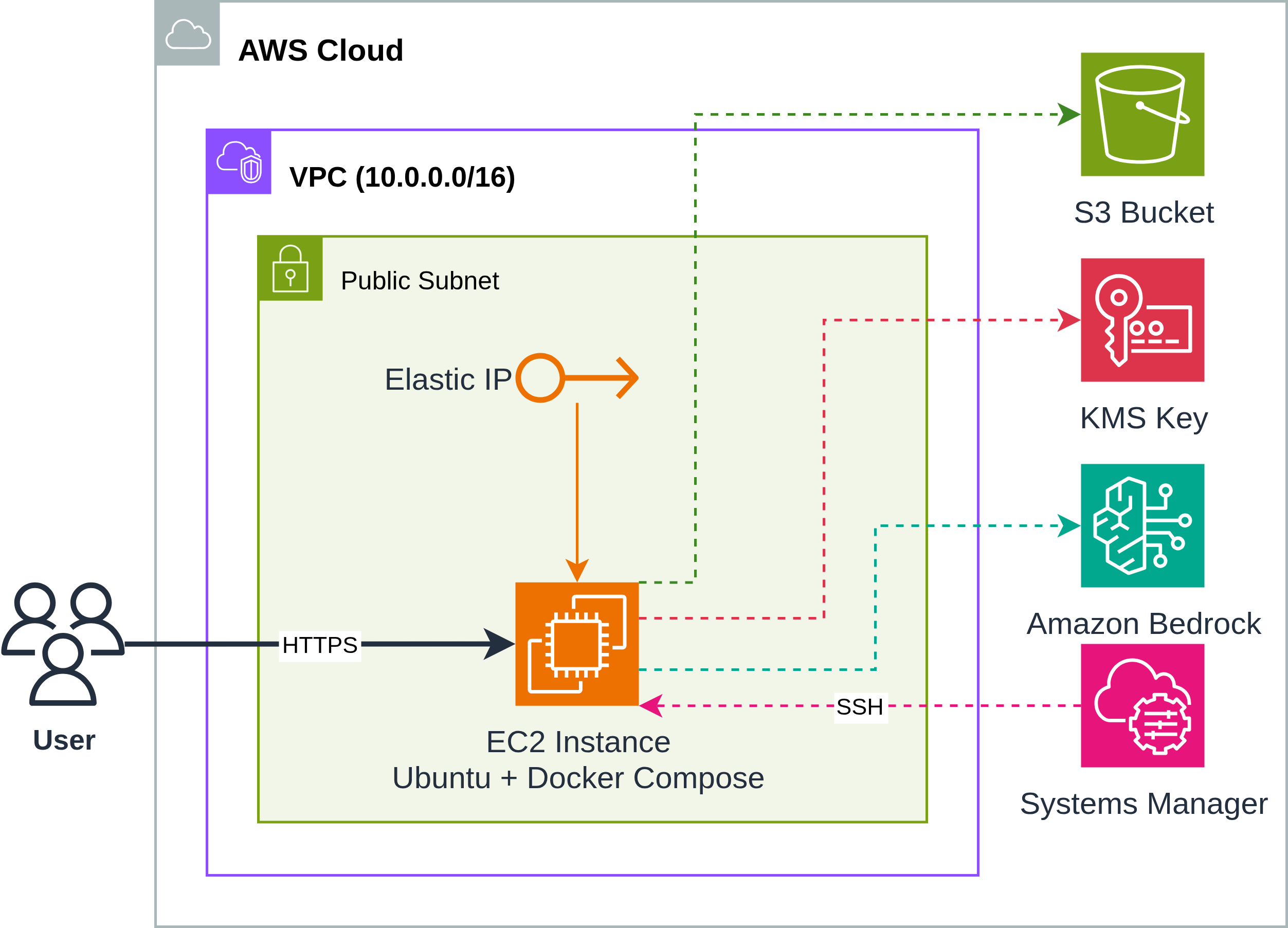
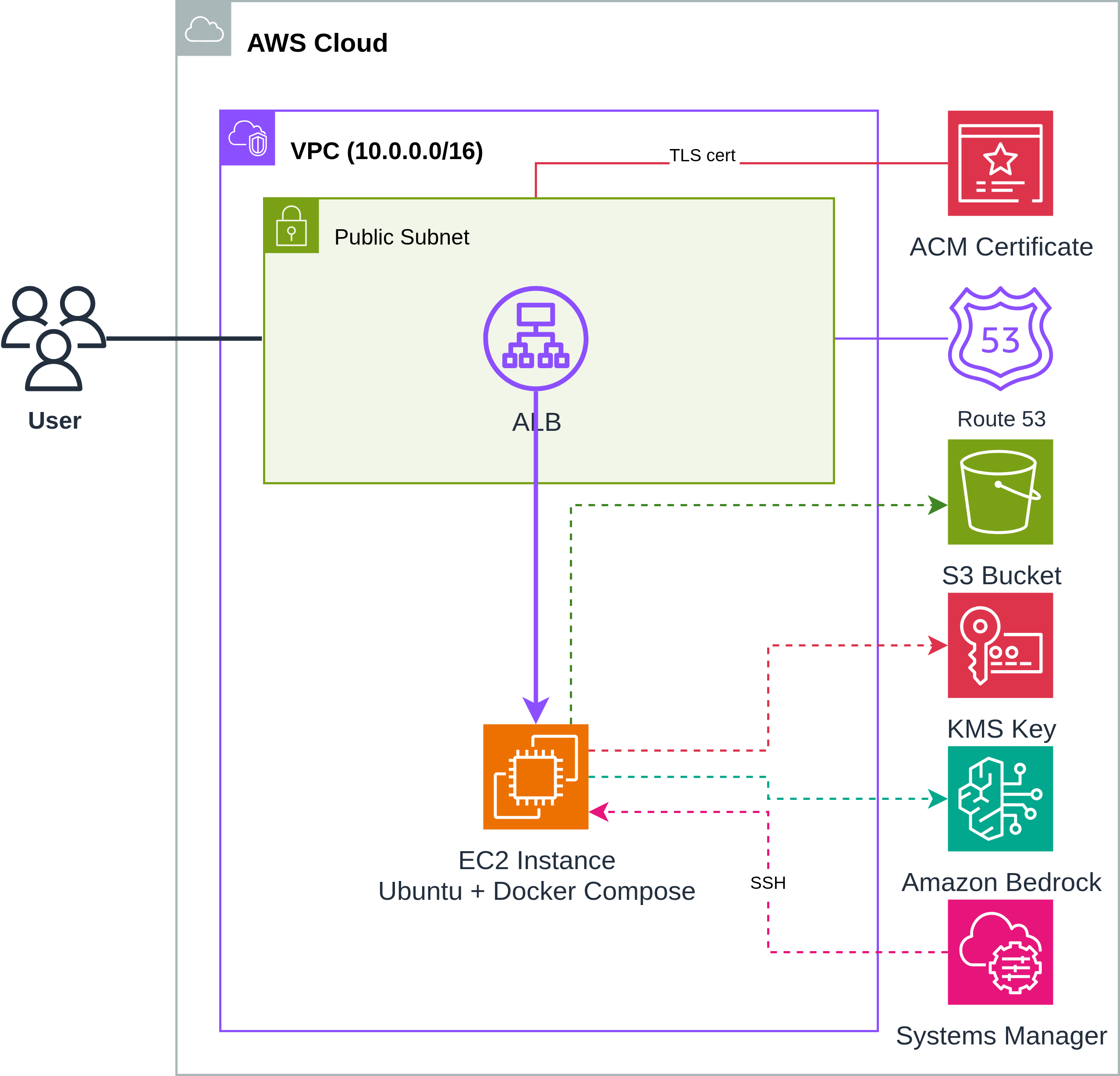
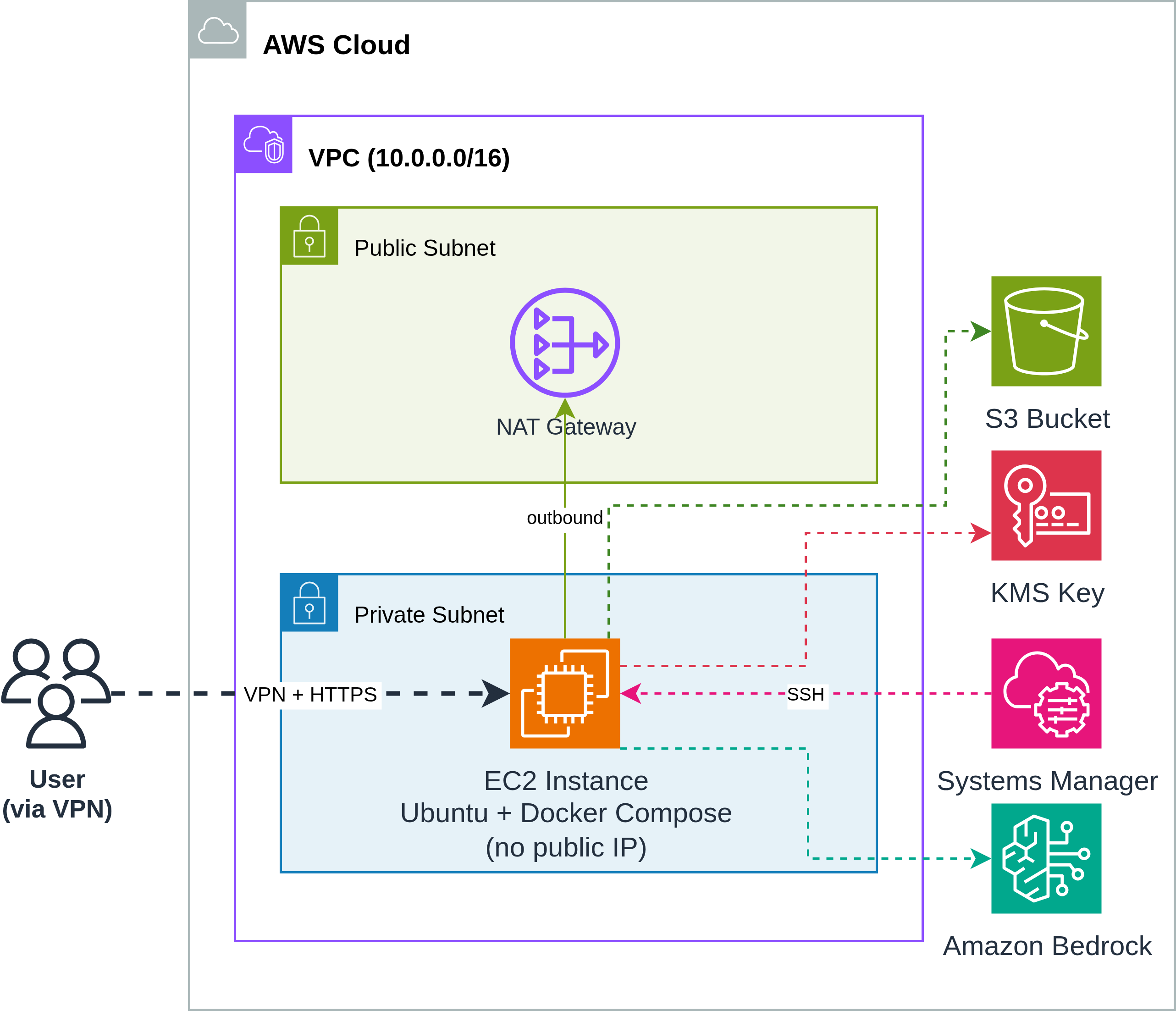
CodeMie On VM runs on a single EC2 instance with supporting AWS services. Terraform provisions the following resources depending on the network mode:
- IP Mode (default)
- Domain Mode (ALB + ACM)
- Private IP Mode
Direct access to the EC2 instance via Elastic IP:
When TF_VAR_platform_domain_name is configured, an ALB with trusted TLS certificate is created:
When TF_VAR_private_ip_only=true, EC2 is placed in a private subnet with NAT Gateway for outbound traffic. Access is via VPN, AWS Workspaces, or some other available VM:
AWS Resources
| Resource | Purpose |
|---|---|
| VPC | Isolated network with public subnets (+ private if private_ip_only) |
| EC2 Instance | Single instance running Docker Compose (Ubuntu, r5.xlarge default) |
| Elastic IP | Static public IP for the EC2 instance |
| S3 Bucket | Persistent storage for user data (repos, files) |
| KMS Key | Encryption key for S3 data at rest |
| ALB | Application Load Balancer with TLS (if domain configured) |
| ACM Certificate | Trusted TLS certificate for the domain (if domain configured) |
| Route 53 Record | DNS A record pointing to ALB (if domain configured) |
| SSM Parameter | Stores EC2 SSH private key securely |
| Security Groups | Controls inbound traffic to ALB and EC2 |
| IAM Instance Profile | Grants EC2 access to Bedrock, S3, KMS, SSM |
Network Modes
| Mode | Configuration | Access |
|---|---|---|
| Public IP (default) | TF_VAR_private_ip_only=false | EC2 gets EIP, direct HTTPS access |
| Domain + ALB | TF_VAR_platform_domain_name="example.com" | ALB with ACM cert, Route 53 DNS |
| Private IP | TF_VAR_private_ip_only=true | No public IP, access via VPN only |
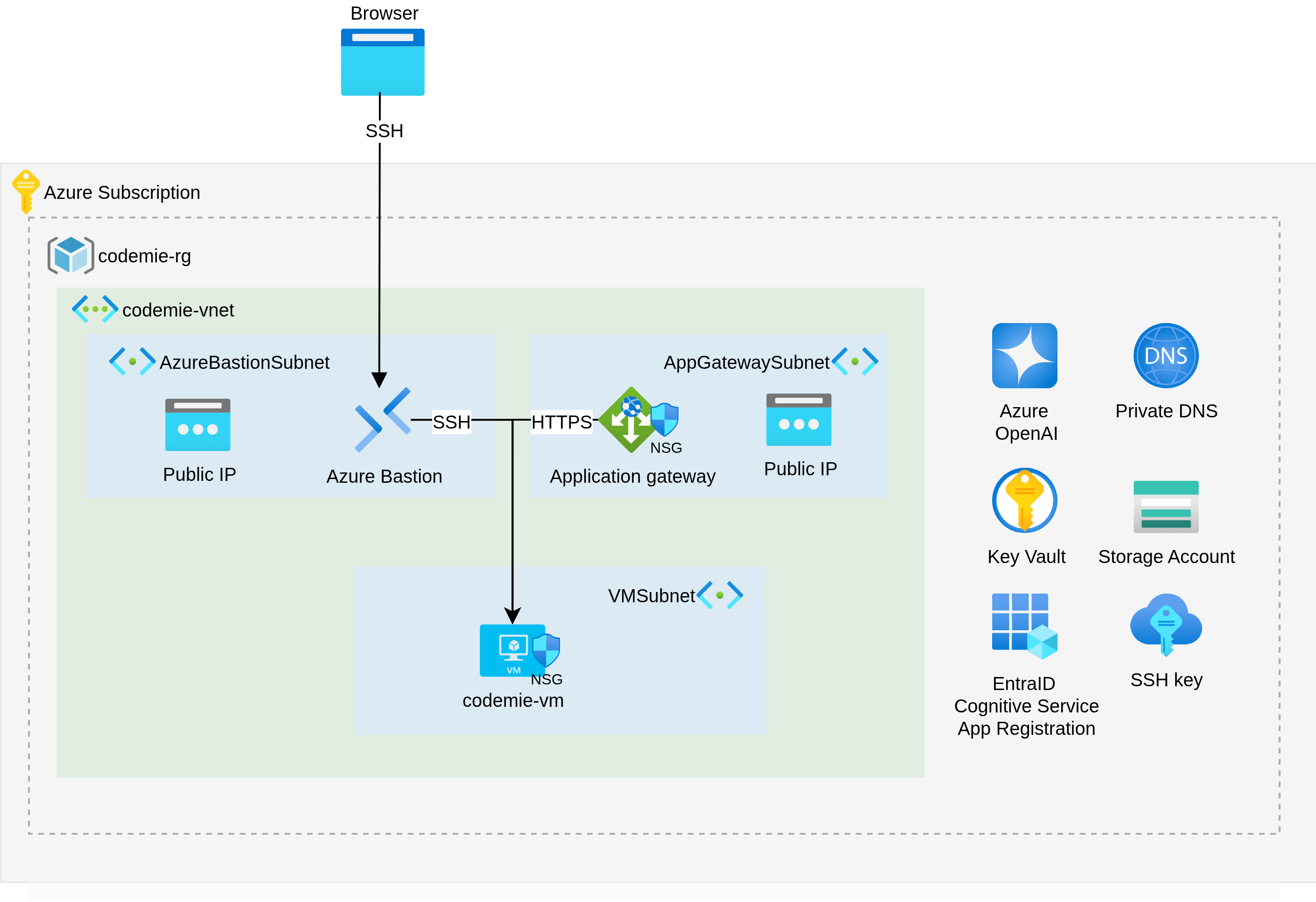
CodeMie On VM runs on a single Azure VM with supporting Azure services. Terraform provisions the following resources:
Azure Resources
| Resource | Purpose |
|---|---|
| Azure VM (Standard_E4s_v5) | Single VM running Docker Compose (4 vCPU, 32 GB RAM) |
| Virtual Network / Subnet | Isolated network for the VM |
| Network Security Group | Controls inbound/outbound traffic to the VM |
| Azure Storage Account | Persistent storage for user data (repos, files) |
| Azure Key Vault | Encryption key management for storage data |
| Private DNS Zone | Custom domain resolution (when TF_VAR_platform_domain_name is set) |
| Azure Bastion | Secure SSH access to the VM without exposing a public IP |
Network Modes
| Mode | Configuration | Access |
|---|---|---|
| Private IP (default) | TF_VAR_platform_domain_name empty | VM private IP, access via VPN or Bastion |
| Domain | TF_VAR_platform_domain_name="private.lab.com" | Creates private DNS zone, access via name |
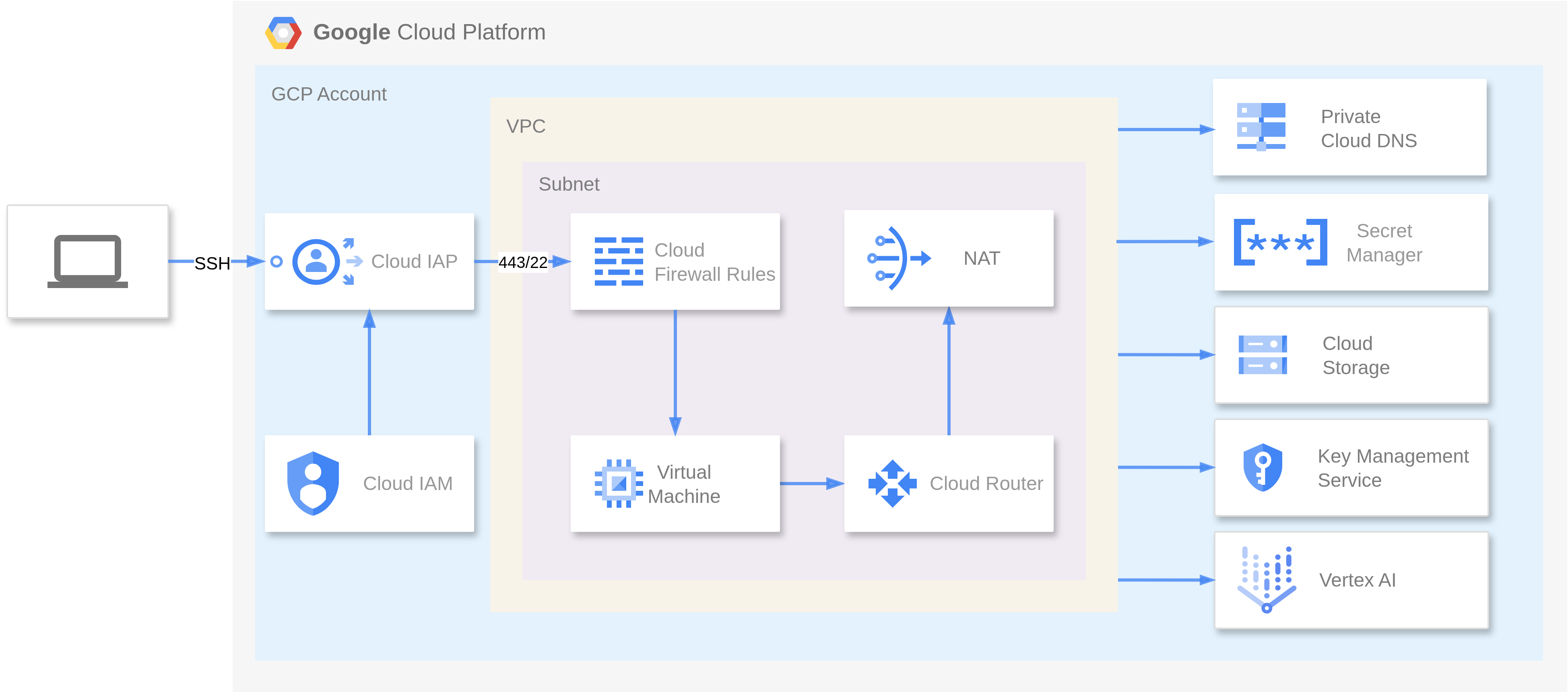
CodeMie On VM runs on a single GCE VM with supporting GCP services. Terraform provisions the following resources:
GCP Resources
| Resource | Purpose |
|---|---|
| GCE VM (n2-highmem-4) | Single VM running Docker Compose (4 vCPU, 32 GB RAM) |
| VPC / Subnet | Isolated network for the VM |
| Firewall Rules | Controls inbound/outbound traffic to the VM |
| GCS Bucket | Persistent storage for user data (repos, files) |
| Cloud KMS Key | Encryption key management for storage data |
| Cloud DNS Private Zone | Custom domain resolution (when TF_VAR_platform_domain_name is set) |
| IAP (Identity-Aware Proxy) | Secure SSH access to the VM without exposing a public IP |
| Secret Manager | Stores the SSH private key for VM access |
Network Modes
| Mode | Configuration | Access |
|---|---|---|
| Private IP (default) | TF_VAR_platform_domain_name empty | VM private IP, access via VPN or IAP |
| Domain | TF_VAR_platform_domain_name="codemie.internal" | Creates Cloud DNS private zone, access via name |
On-VM Resource Requirements
- AWS
- Azure
- GCP
| Resource | Minimum | Recommended |
|---|---|---|
| vCPU | 4 | 4 (r5.xlarge) |
| RAM | 16 GB | 32 GB |
| Disk | 50 GB | 100 GB (gp3) |
| Resource | Minimum | Recommended |
|---|---|---|
| vCPU | 4 | 4 (Standard_E4s_v5) |
| RAM | 16 GB | 32 GB |
| Disk | 50 GB | 100 GB |
| Resource | Minimum | Recommended |
|---|---|---|
| vCPU | 4 | 4 (n2-highmem-4) |
| RAM | 16 GB | 32 GB |
| Disk | 50 GB | 100 GB |