CodeMie CLI: Unified AI Coding Agent Ecosystem
This is an enterprise feature.
Overview
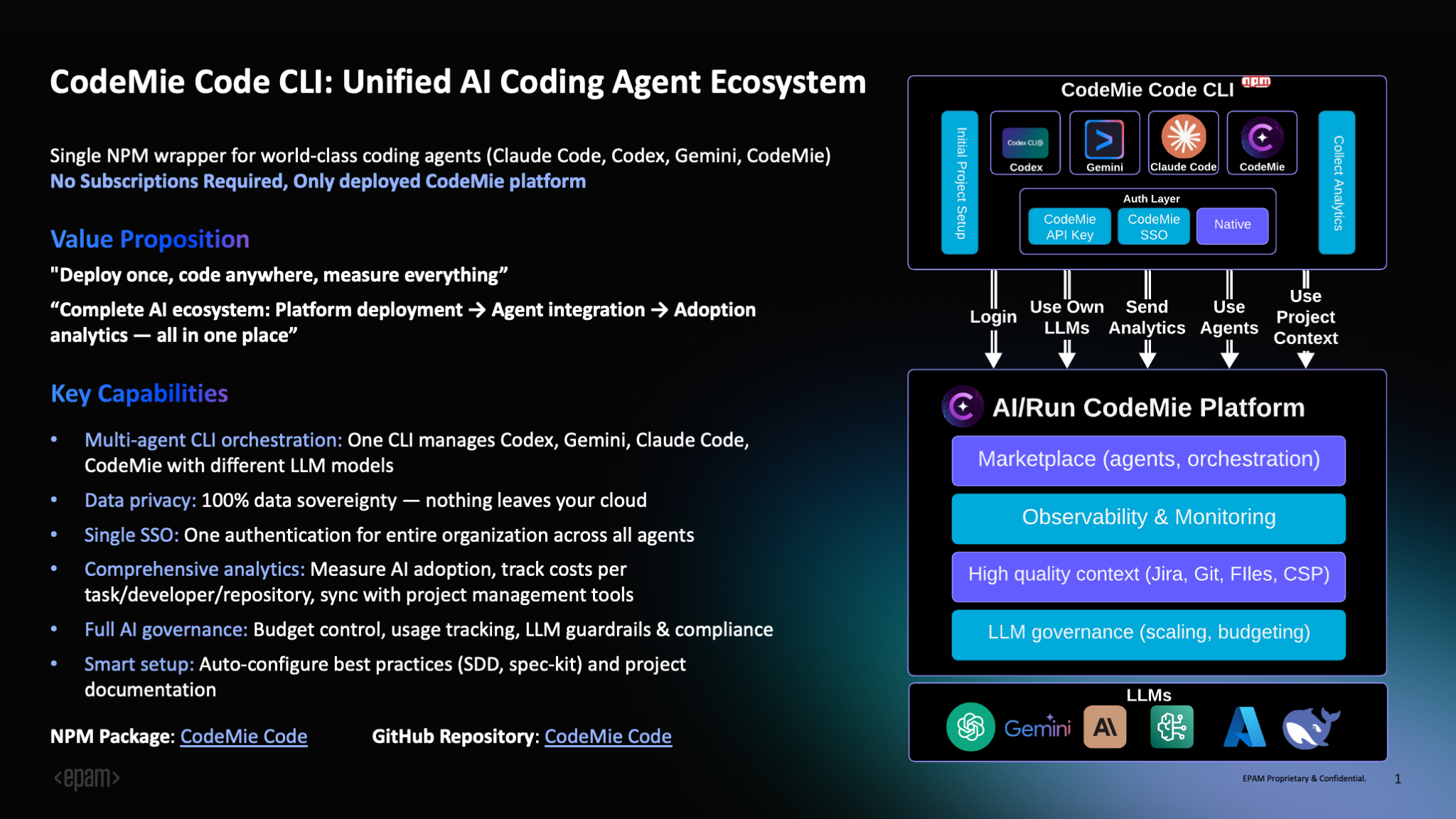
CodeMie CLI is a unified command-line interface that provides access to multiple AI coding assistants through a single NPM package. It serves as a wrapper for popular AI coding agents including Claude Code, Gemini CLI, OpenCode, and a built-in agent powered by LangGraph.
Key Capabilities
Multi-Agent Orchestration: Manage multiple AI coding agents from one CLI - Claude Code, Gemini, OpenCode, and the built-in CodeMie agent. Each agent can be powered by different LLM models, allowing developers to choose the appropriate assistant for each task: Claude Code for complex refactoring, Gemini for rapid prototyping, or the built-in agent for file operations and planning.
Profile Management: Maintain separate configurations for different contexts (work, personal, team projects). Each profile can be configured with its own provider (Azure OpenAI, AWS Bedrock, or LiteLLM), enabling seamless switching between environments.
Enterprise Features: Built-in support for SSO authentication via CodeMie platform, comprehensive analytics and usage tracking, audit logging with session management, secrets scanning via Gitleaks, budget controls, and governance policies.
Data Sovereignty: All data remains within your infrastructure. AI interactions stay in your cloud environment, supporting compliance with security and data protection requirements.
Analytics and Monitoring: Track session count, duration, token usage, cost estimates, tool usage statistics, cache hit rates, and language statistics. All analytics data is stored locally for complete control.
Why Choose CodeMie CLI?
No Subscriptions Required
CodeMie CLI operates on a bring-your-own-infrastructure model. For enterprises, there are no subscriptions or licenses required - you only need:
- CodeMie Platform: Deployed in your cloud environment (AWS, GCP, or Azure)
- LiteLLM Proxy: Installed as part of your CodeMie platform for unified model access - see the LiteLLM Proxy Deployment Guide
- LLM Models: Access to AI models through your existing cloud provider:
- AWS: Bedrock models (Claude, Titan, etc.)
- Azure: Azure OpenAI Service
- GCP: Vertex AI models
No per-developer fees, no seat licenses - just your infrastructure costs and model API usage. Your organization maintains full control over data, costs, and governance.
Enterprise Benefits
Complete Data Control: Your code never leaves your infrastructure. All AI interactions are routed through your deployed CodeMie platform and LiteLLM Proxy, ensuring 100% data sovereignty and compliance with enterprise security policies.
Unified Authentication: Single sign-on (SSO) via CodeMie platform eliminates API key management. One authentication with your CodeMie credentials gives developers access across all agents, with secure credential storage in system keychains.
Cost Management: Track and control AI spending with detailed analytics showing costs per task, developer, and repository. Set budget limits and receive alerts when thresholds are approached.
Governance and Compliance: Implement LLM guardrails, audit logging with session tracking, secrets scanning for credential leaks, and usage reporting for compliance requirements.
For Individual Developers and Teams
Flexibility: Switch between different AI models and providers based on task requirements. Use Claude for complex reasoning, GPT for speed, or Gemini for multimodal tasks.
Productivity: Built-in planning tools, task management, and integrated analytics help track productivity gains and optimize AI usage patterns.
Team Standardization: Standardize on a unified CLI across the team with consistent workflows, reducing onboarding time and ensuring best practices.
Installation
Prerequisites
- Node.js: 20.0.0 or higher
- npm: Bundled with Node.js
- CodeMie Platform: Deployed instance with LiteLLM Proxy configured (for SSO authentication)
- LLM Access: One of the following:
- AWS Bedrock with model access
- Azure OpenAI Service
- Google Cloud Vertex AI
Global Installation
npm install -g @codemieai/code
Setup Configuration
Run the interactive setup wizard to configure authentication and model selection:
codemie setup
Configuration steps:
- Profile Creation: Name your configuration (e.g., "work", "personal")
- Provider Selection: Choose from Azure OpenAI, AWS Bedrock, LiteLLM, or CodeMie SSO
- Authentication: Configure API keys or CodeMie platform credentials
- Model Selection: Pick your preferred LLM model with real-time availability checking
- Verification: Test your configuration with a health check
Install Agents
After setup, install the agents you want to use:
# Install Claude Code (latest supported version)
codemie install claude --supported

# Install Gemini CLI
codemie install gemini --supported

# Install OpenCode
codemie install opencode --supported

# Verify installation
codemie doctor
The built-in agent (codemie-code) is available immediately after setup without installation.
For detailed configuration, authentication methods, troubleshooting, and advanced usage, see the CodeMie CLI GitHub Repository.
Commands
Core Commands
Profile Management
codemie profile                      # List all profiles
codemie profile switch <name>        # Switch active profile
codemie profile delete <name>        # Remove a profile
Agent Installation
codemie install claude --supported   # Install Claude Code
codemie install gemini --supported   # Install Gemini CLI
codemie install opencode --supported # Install OpenCode
codemie uninstall <agent>            # Remove an agent
System Commands
codemie setup                        # Configuration wizard
codemie doctor                       # Health check and diagnostics
codemie --version                    # Show version
codemie --help                       # Show help
Agent Shortcuts
Run AI Assistants
All agents support two modes:
# Interactive mode (stays open for conversation)
codemie-code                         # Built-in CodeMie agent
codemie-claude                       # Claude Code agent
codemie-gemini                       # Gemini CLI agent
codemie-opencode                     # OpenCode agent

# Single task mode (executes and exits)
codemie-code --task "<prompt>"       # Built-in CodeMie agent
codemie-claude --task "<prompt>"     # Claude Code agent
codemie-gemini --task "<prompt>"     # Gemini CLI agent
codemie-opencode --task "<prompt>"   # OpenCode agent
Common Options:
--task "<prompt>": Execute single task and exit--profile <name>: Use specific profile--model <model>: Override default model--help: Show agent-specific help
Example Workflows
# Code review (single task)
codemie-code --task "Review this PR for security issues and performance bottlenecks"

# Bug fixing
codemie-claude --task "Fix the authentication bug in src/auth.ts"

# Test generation
codemie-gemini --task "Generate comprehensive unit tests for the API endpoints"

# Documentation
codemie-code --task "Document the functions in utils/helpers.js with JSDoc comments"

# Multi-profile usage
codemie-claude --profile work --task "Review company codebase"
codemie profile switch personal
codemie-code --task "Help with my open source project"

# Interactive mode for exploratory work
codemie-claude
> Review my authentication code
> Now refactor it to use JWT tokens
> Add error handling
> exit
Analytics and Monitoring
View Analytics
codemie analytics                    # Show all analytics
codemie analytics --agent claude     # Filter by agent
codemie analytics --last 7d          # Last 7 days
codemie analytics --export json      # Export to JSON
Log Management
codemie log                          # Show recent logs
codemie log --level error            # Show only errors
codemie log follow                   # Real-time monitoring (tail-like)
codemie log session <id>             # View specific session details
Tracked metrics include:
- Session count, duration, and token usage (input/output/total)
- Cost estimates based on model pricing
- Tool usage statistics with success/failure rates
- Cache hit rates and efficiency metrics
- Language statistics (lines added, files created/modified)
Resources
- GitHub Repository: https://github.com/codemie-ai/codemie-code
- NPM Package: https://www.npmjs.com/package/@codemieai/code
- Issue Tracker: https://github.com/codemie-ai/codemie-code/issues
- Documentation: See repository for detailed configuration, authentication, and architecture guides