AI/Run CodeMie Deployment Architecture
This page provides an overview of the AI/Run CodeMie deployment architecture on Microsoft Azure, including infrastructure components, network design, and resource requirements.
Architecture Overview
AI/Run CodeMie is deployed on Azure Kubernetes Service (AKS) with supporting Azure services for networking, storage, and identity management.
High-Level Architecture Diagram
The diagram below illustrates the complete AI/Run CodeMie infrastructure deployment on Azure:
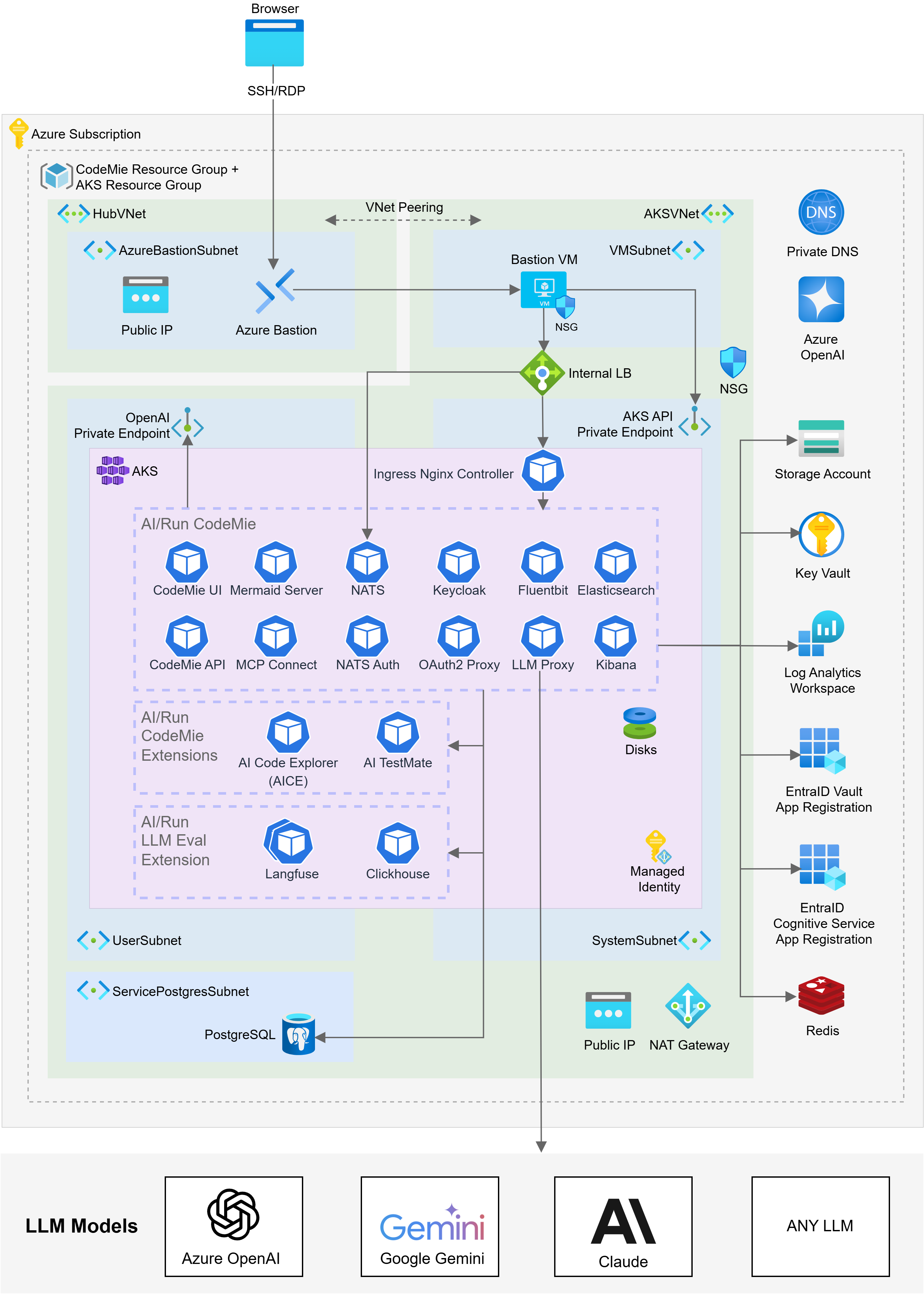
The architecture can be customized based on your organization's security policies, compliance requirements, and operational preferences. Consult with your deployment team to discuss specific requirements.
Resource Requirements
Container Resource Requirements
The table below specifies resource requirements for AI/Run CodeMie components sized for high-scale production deployments supporting 500+ concurrent users.
| Component | Pods | RAM | vCPU | Storage |
|---|---|---|---|---|
| CodeMie API | 2 | 8Gi | 4.0 | – |
| CodeMie UI | 1 | 128Mi | 0.1 | – |
| Elasticsearch | 2 | 16Gi | 4.0 | 200 GB per pod |
| Kibana | 1 | 1Gi | 1.0 | – |
| Mermaid-server | 1 | 512Mi | 1.0 | – |
| PostgreSQL | Managed service in cloud | – | – | 30-50 GB |
| Keycloak + DB | 1 + 1 | 4Gi | 2.0 | 1 GB |
| Oauth2-proxy | 1 | 128Mi | 0.1 | – |
| NATS + Auth Callout | 1 + 1 | 512Mi | 1.0 | – |
| MCP Connect | 1 | 1Gi | 0.5 | – |
| Fluent Bit | DaemonSet | 128Mi | 0.1 | – |
| LLM Proxy | 1 | 1Gi | 1.0 | – |
The listed requirements are designed for high-scale production deployments. For smaller teams and lower concurrency, some resources can be scaled down:
- User Concurrency: API replicas can be scaled depending on the load
- Data Volume: Elasticsearch stores vector datasources, user metrics and container logs, therefore storage grows with datasources amount and size and log retention policies
- Database Sizing: PostgreSQL managed service tier depends on user count, the amount of resources they create in CodeMie, and additional extensions connected to CodeMie that share the same database instance
- LLM Proxy: Resource requirements depend on the exact LLM proxy type being used
Next Steps
After understanding the architecture, proceed to:
- Infrastructure Deployment - Deploy the Azure infrastructure using Terraform
- Components Deployment - Deploy AI/Run CodeMie application components using Helm