AI/Run CodeMie Components Deployment
Overview
This section guides you through deploying the AI/Run CodeMie application stack on your AKS cluster. After completing infrastructure deployment, this phase installs all necessary Kubernetes components including:
- Core AI/Run CodeMie services (API, UI, MCP Connect, NATS Auth)
- Data layer (Elasticsearch, PostgreSQL via operators)
- Security & Identity (Keycloak, OAuth2 Proxy)
- Infrastructure services (Ingress controller, storage)
- Observability (Kibana, Fluent Bit)
- Optional LLM Proxy (for load balancing AI model requests)
The deployment uses Helm charts to install and configure all components in the correct order, ensuring proper dependencies and integration.
This phase assumes you have completed Infrastructure Deployment and have a running AKS cluster with network, storage, and security configured.
Application Stack Components
The AI/Run CodeMie application consists of multiple integrated components organized into functional categories:
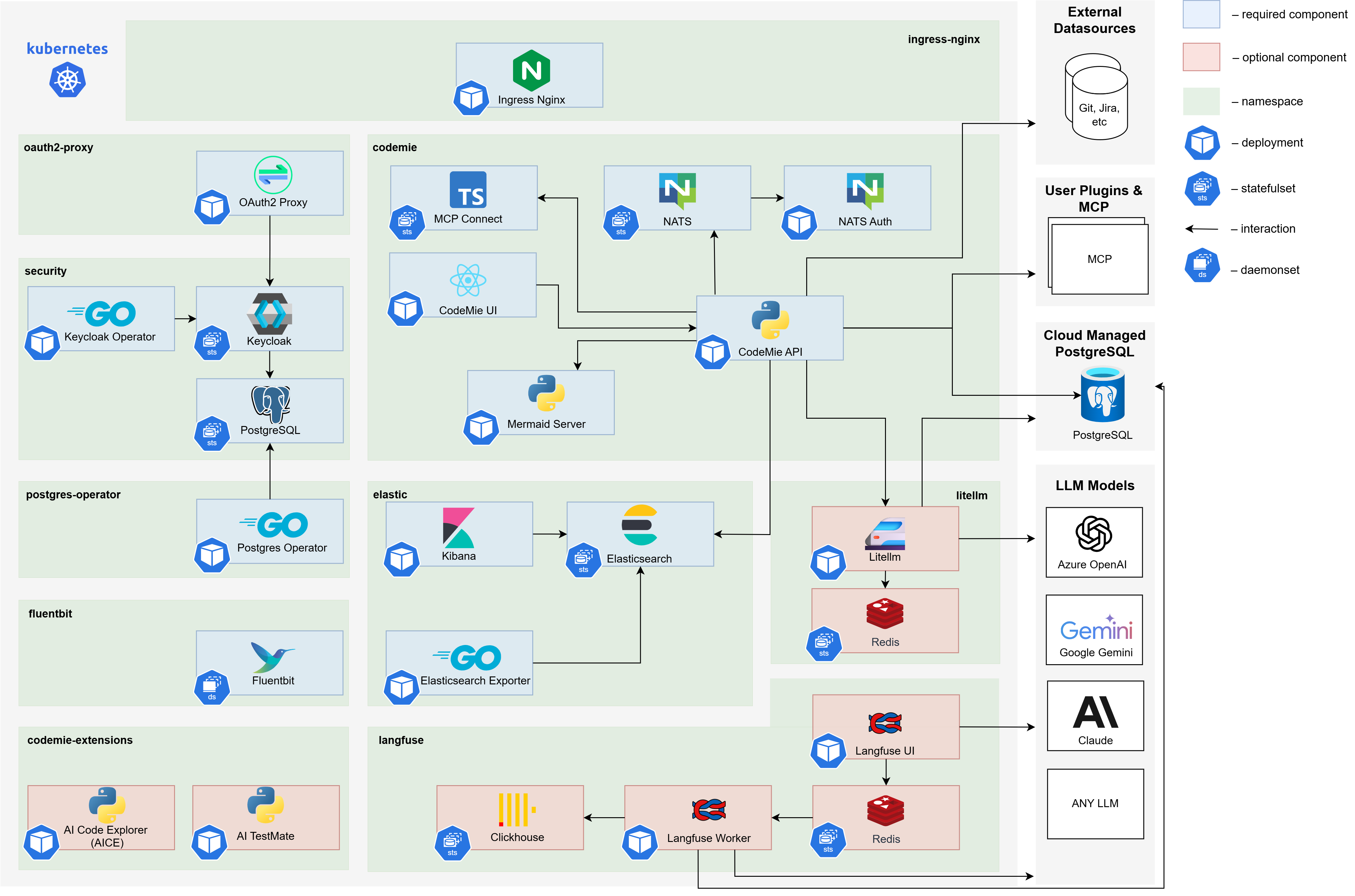
Core AI/Run CodeMie Services
Proprietary services that provide the main AI/Run CodeMie functionality:
| Component | Container Registry | Description |
|---|---|---|
| CodeMie API | europe-west3-docker.pkg.dev/.../codemie:x.y.z | Backend service handling business logic, data processing, and API operations |
| CodeMie UI | europe-west3-docker.pkg.dev/.../codemie-ui:x.y.z | Frontend web application providing the user interface |
| NATS Auth Callout | europe-west3-docker.pkg.dev/.../codemie-nats-auth-callout:x.y.z | Authentication and authorization service for NATS messaging (Plugin Engine component) |
| MCP Connect | europe-west3-docker.pkg.dev/.../codemie-mcp-connect-service:x.y.z | Bridge enabling CodeMie to communicate with MCP servers |
| Mermaid Server | europe-west3-docker.pkg.dev/.../mermaid-server:x.y.z | Diagram generation service for visualization in chats |
To find the latest release versions for CodeMie components:
# Clone the helm charts repository
git clone git@gitbud.epam.com:epm-cdme/codemie-helm-charts.git
cd codemie-helm-charts

# Check latest versions (requires GCR authentication)
bash get-codemie-latest-release-version.sh -c /path/to/key.json
Note: Docker container versions match Helm chart release versions.
Data Layer
Database and search components for data persistence:
| Component | Container Registry | Description |
|---|---|---|
| Elasticsearch | docker.elastic.co/elasticsearch/elasticsearch:x.y.z | Primary data store for AI/Run CodeMie (datasources, projects, conversations, etc.) |
| Kibana | docker.elastic.co/kibana/kibana:x.y.z | Analytics and visualization interface for Elasticsearch data |
| PostgreSQL Operator | registry.developers.crunchydata.com/.../postgres-operator:x.y.z | Manages PostgreSQL instances for Keycloak |
Security & Identity Management
Authentication and authorization components:
| Component | Container Registry | Description |
|---|---|---|
| Keycloak Operator | epamedp/keycloak-operator:x.y.z | Manages Keycloak deployment and configuration |
| Keycloak | quay.io/keycloak/keycloak:x.y.z | Identity and access management (IAM) solution providing SSO, authentication |
| OAuth2 Proxy | quay.io/oauth2-proxy/oauth2-proxy:x.y.z | Authentication middleware integrating with Keycloak for secure access |
Infrastructure Services
Essential Kubernetes infrastructure components:
| Component | Container Registry | Description |
|---|---|---|
| Nginx Ingress Controller | registry.k8s.io/ingress-nginx/controller:x.y.z | Routes external traffic to internal services |
| Storage Class | Azure CSI Driver | Provides persistent volumes for stateful components |
Messaging & Integration
Message broker for Plugin Engine:
| Component | Container Registry | Description |
|---|---|---|
| NATS | nats:x.y.z | High-performance messaging system for Plugin Engine communication |
Observability
Logging and monitoring components:
| Component | Container Registry | Description |
|---|---|---|
| Fluent Bit | cr.fluentbit.io/fluent/fluent-bit:x.y.z | Lightweight log collector enabling agent observability |
Optional Components
Components that can be omitted based on configuration:
| Component | Container Registry | Description |
|---|---|---|
| LLM Proxy | – | Optional proxy for load balancing and high availability of AI model requests and usage insights |
Deployment Dependencies
Components must be deployed in the following order due to dependencies:
- Infrastructure → Ingress Controller, Storage Class
- Operators → PostgreSQL Operator, Keycloak Operator
- Data Layer → Elasticsearch, PostgreSQL instances
- Security → Keycloak, OAuth2 Proxy
- Messaging → NATS
- Core Services → CodeMie API, UI, MCP Connect, NATS Auth
- Observability → Fluent Bit, Kibana
- Optional → LLM Proxy (if needed)
Prerequisites
Cluster Readiness
Ensure your AKS cluster is ready for component deployment:
- Infrastructure Deployed: Completed Infrastructure Deployment phase
- Cluster Access: kubectl configured and authenticated to AKS cluster
- Jumpbox Access: Connected to Jumpbox VM via Azure Bastion (for deployment)
Required Components
The following components will be installed during this phase if not already present:
- Nginx Ingress Controller: Routes external traffic to services
- Azure Storage Class: Provides persistent storage for stateful components
These components will be installed automatically if not already present in your cluster. Both scripted and manual deployment procedures include the necessary installation steps.
Repository and Access
Helm Charts Repository
Clone the Helm charts repository on your deployment machine (Jumpbox or local workstation):
git clone git@gitbud.epam.com:epm-cdme/codemie-helm-charts.git
cd codemie-helm-charts
Container Registry Credentials
Before deploying AI/Run CodeMie components, you need to set up authentication for the container registry.
Request Access: Ask the AI/Run CodeMie team to provide:
key.jsonfile (GCP service account credentials)- Service account email for pulling images from GCR
Create Namespace:
kubectl create namespace codemie
Configure Registry Secret:
Replace %%PROJECT_NAME%% with your project name and create the pull secret:
kubectl create secret docker-registry gcp-artifact-registry \
  --docker-server=https://europe-west3-docker.pkg.dev \
  --docker-email=`<client_email from shared with you key>` \
  --docker-username=_json_key \
  --docker-password="$(cat key.json)" \
  -n codemie
Verify Secret:
kubectl get secret gcp-artifact-registry -n codemie
The gcp-artifact-registry secret must be referenced in all AI/Run CodeMie component deployments: codemie-ui, codemie-api, codemie-nats-auth-callout, codemie-mcp-connect-service, and mermaid-server.
This is configured automatically in the values files:
imagePullSecrets:
  - name: gcp-artifact-registry
Deployment Methods
Two deployment approaches are available depending on your needs:
Scripted Deployment (Recommended)
Automated deployment using the helm-charts.sh wrapper script:
- Best for: Standard deployments, quick setup, production environments
- Advantages: Automated dependency ordering, validation checks, consistent configuration
Manual Deployment
Step-by-step manual installation of each component:
- Best for: Custom configurations, learning the stack, troubleshooting
- Advantages: Full control over each component, easier to debug issues
Use Scripted Deployment for initial installations. Switch to manual deployment only if you need custom configurations or are troubleshooting specific issues.